论文必备 - RT-DETR输出模型每一层的耗时和GFLOPs,深入比较每一层模块的改进效果
前言
在做一些比较实验中,特别是在模型轻量化时,如何更精确的查看和对比我们的改进模块时候有效,是否有提升呢?
这时候我们就可以打印改进模型中每一层的 耗时 和 GFLOPS 来比较不同模块的占用量。这样就可以有针对性的改进我们的模型,并且在写论文中直接展示某一层的改进效果,会更加的直观,也能够丰富论文内容。
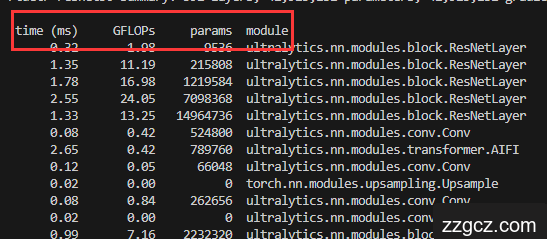
在下方的实现效果中,可以看出来能够打印每一层的相关
耗时time
,
计算量GFLOPs
,
参数量params
等,可查看改进后的任意模型,并且可调节
batch-size
。
核心代码
在
根目录
新建
print.py
,并填入如下代码:
import argparse
from pathlib import Path
from typing import Optional
import inspect
import os
import sys
import platform

import torch
from ultralytics.nn.tasks import DetectionModel
from ultralytics.utils import LOGGER, colorstr
from ultralytics.utils.torch_utils import profile
from datetime import datetime
from ultralytics.utils.checks import check_yaml, git_describe

Model = DetectionModel  # retain YOLO 'Model' class for backwards compatibility

FILE = Path(__file__).resolve()
ROOT = FILE.parents[1]  # YOLO root directory
if str(ROOT) not in sys.path:
    sys.path.append(str(ROOT))  # add ROOT to PATH
if platform.system() != 'Windows':
    ROOT = Path(os.path.relpath(ROOT, Path.cwd()))  # relative

def print_args(args: Optional[dict] = None, show_file=True, show_func=False):
    # Print function arguments (optional args dict)
    x = inspect.currentframe().f_back  # previous frame
    file, _, func, _, _ = inspect.getframeinfo(x)
    if args is None:  # get args automatically
        args, _, _, frm = inspect.getargvalues(x)
        args = {k: v for k, v in frm.items() if k in args}
    try:
        file = Path(file).resolve().relative_to(ROOT).with_suffix('')
    except ValueError:
        file = Path(file).stem
    s = (f'{file}: ' if show_file else '') + (f'{func}: ' if show_func else '')
    LOGGER.info(colorstr(s) + ', '.join(f'{k}={v}' for k, v in args.items()))

def file_date(path=__file__):
    # Return human-readable file modification date, i.e. '2021-3-26'
    t = datetime.fromtimestamp(Path(path).stat().st_mtime)
    return f'{t.year}-{t.month}-{t.day}'

def select_device(device='', batch_size=0, newline=True):
    # device = None or 'cpu' or 0 or '0' or '0,1,2,3'
    s = f'YOLO 🚀 {git_describe() or file_date()} Python-{platform.python_version()} torch-{torch.__version__} '
    device = str(device).strip().lower().replace('cuda:', '').replace('none', '')  # to string, 'cuda:0' to '0'
    cpu = device == 'cpu'
    mps = device == 'mps'  # Apple Metal Performance Shaders (MPS)
    if cpu or mps:
        os.environ['CUDA_VISIBLE_DEVICES'] = '-1'  # force torch.cuda.is_available() = False
    elif device:  # non-cpu device requested
        os.environ['CUDA_VISIBLE_DEVICES'] = device  # set environment variable - must be before assert is_available()
        assert torch.cuda.is_available() and torch.cuda.device_count() >= len(device.replace(',', '')), \
            f"Invalid CUDA '--device {device}' requested, use '--device cpu' or pass valid CUDA device(s)"

    if not cpu and not mps and torch.cuda.is_available():  # prefer GPU if available
        devices = device.split(',') if device else '0'  # range(torch.cuda.device_count())  # i.e. 0,1,6,7
        n = len(devices)  # device count
        if n > 1 and batch_size > 0:  # check batch_size is divisible by device_count
            assert batch_size % n == 0, f'batch-size {batch_size} not multiple of GPU count {n}'
        space = ' ' * (len(s) + 1)
        for i, d in enumerate(devices):
            p = torch.cuda.get_device_properties(i)
            s += f"{'' if i == 0 else space}CUDA:{d} ({p.name}, {p.total_memory / (1 << 20):.0f}MiB)\n"  # bytes to MB
        arg = 'cuda:0'
    elif mps and getattr(torch, 'has_mps', False) and torch.backends.mps.is_available():  # prefer MPS if available
        s += 'MPS\n'
        arg = 'mps'
    else:  # revert to CPU
        s += 'CPU\n'
        arg = 'cpu'

    if not newline:
        s = s.rstrip()
    LOGGER.info(s)
    return torch.device(arg)

if __name__ == '__main__':
    parser = argparse.ArgumentParser()
    parser.add_argument('--cfg', type=str, default='ultralytics/cfg/models/rt-detr/rtdetr-resnet50.yaml', help='model.yaml')
    parser.add_argument('--batch-size', type=int, default=1, help='total batch size for all GPUs')
    parser.add_argument('--device', default='0', help='cuda device, i.e. 0 or 0,1,2,3 or cpu')
    parser.add_argument('--profile', action='store_true',default=True, help='profile model speed')
    parser.add_argument('--line-profile', action='store_true', default=True, help='profile model speed layer by layer')
    parser.add_argument('--test', action='store_true', help='test all yolo*.yaml')
    opt = parser.parse_args()
    opt.cfg = check_yaml(opt.cfg)  # check YAML
    print_args(vars(opt))
    device = select_device(opt.device)

    # Create model
    im = torch.rand(opt.batch_size, 3, 640, 640).to(device)
    model = Model(opt.cfg).to(device)
    model.eval()

    # Options
    if opt.line_profile:  # profile layer by layer
        model(im, profile=True)

    elif opt.profile:  # profile forward-backward
        results = profile(input=im, ops=[model], n=3)

    elif opt.test:  # test all models
        for cfg in Path(ROOT / 'models').rglob('yolo*.yaml'):
            try:
                _ = Model(cfg)
            except Exception as e:
                print(f'Error in {cfg}: {e}')

    else:  # report fused model summary
        model.fuse()

参数解释
需要调整的参数在
if __name__ == '__main__':
中
-
cfg:指向 模型的配置文件 ,即要查看的模型,我这里设置的是rtdetr-resnet50.yaml,目前只适用于resnet系列及其相关的改进模型,HGBlock还有报错。 -
batch-size:批处理图像的大小,我这里设置成1,越大,速度越快,但需要同一量级下去比较速度 -
device:所选择的设备,GPU:0,1,2...或CPU -
profile:是否打印相关指标,default=True为打印 -
line-profile:是否按行打印,是则添加default=True -
test:是否打印所有配置文件, 否,只需要查看我们指定的即可
配置完成后的参数如下:
if __name__ == '__main__':
    parser = argparse.ArgumentParser()
    parser.add_argument('--cfg', type=str, default='ultralytics/cfg/models/rt-detr/rtdetr-resnet50.yaml', help='model.yaml')
    parser.add_argument('--batch-size', type=int, default=1, help='total batch size for all GPUs')
    parser.add_argument('--device', default='0', help='cuda device, i.e. 0 or 0,1,2,3 or cpu')
    parser.add_argument('--profile', action='store_true',default=True, help='profile model speed')
    parser.add_argument('--line-profile', action='store_true', default=True, help='profile model speed layer by layer')
    parser.add_argument('--test', action='store_true', help='test all yolo*.yaml')
    opt = parser.parse_args()

运行方法及效果
配置完成后运行此代码,可以看到它先输出了模型的结构信息:

紧接着才输出了每一层的
耗时
,
GFLOPs
,
参数量
:
 time (ms)     GFLOPs     params  module
      0.32       1.98       9536  ultralytics.nn.modules.block.ResNetLayer
      1.35      11.19     215808  ultralytics.nn.modules.block.ResNetLayer
      1.78      16.98    1219584  ultralytics.nn.modules.block.ResNetLayer
      2.55      24.05    7098368  ultralytics.nn.modules.block.ResNetLayer
      1.33      13.25   14964736  ultralytics.nn.modules.block.ResNetLayer
      0.08       0.42     524800  ultralytics.nn.modules.conv.Conv
      2.65       0.42     789760  ultralytics.nn.modules.transformer.AIFI
      0.12       0.05      66048  ultralytics.nn.modules.conv.Conv
      0.02       0.00          0  torch.nn.modules.upsampling.Upsample
      0.08       0.84     262656  ultralytics.nn.modules.conv.Conv
      0.02       0.00          0  ultralytics.nn.modules.conv.Concat
      0.99       7.16    2232320  ultralytics.nn.modules.block.RepC3
      0.12       0.21      66048  ultralytics.nn.modules.conv.Conv
      0.02       0.00          0  torch.nn.modules.upsampling.Upsample
      0.09       1.69     131584  ultralytics.nn.modules.conv.Conv
      0.02       0.00          0  ultralytics.nn.modules.conv.Concat
      1.00      28.63    2232320  ultralytics.nn.modules.block.RepC3
      0.13       1.89     590336  ultralytics.nn.modules.conv.Conv
      0.02       0.00          0  ultralytics.nn.modules.conv.Concat
      1.03       7.16    2232320  ultralytics.nn.modules.block.RepC3
      0.14       0.47     590336  ultralytics.nn.modules.conv.Conv
      0.02       0.00          0  ultralytics.nn.modules.conv.Concat
      1.10       1.79    2232320  ultralytics.nn.modules.block.RepC3
     31.87      12.63    7466252  ultralytics.nn.modules.head.RTDETRDecoder
     46.83          -          -  Total

这样就可以查看每一层的
耗时
和
GFLOPs
了。