一、本文介绍
动态蛇形卷积的灵感来源于对管状结构的特殊性的观察和理解,在分割拓扑管状结构、血管和道路等类型的管状结构时,任务的复杂性增加,因为这些结构的局部结构可能非常细长和迂回,而整体形态也可能多变。
因此为了应对这个挑战,作者研究团队注意到了
管状结构的特殊性
,并提出了动态蛇形卷积(Dynamic Snake Convolution)这个方法。动态蛇形卷积通过自适应地聚焦于细长和迂回的局部结构,准确地捕捉管状结构的特征。这种卷积方法的核心思想是,
通过动态形状的卷积核来增强感知能力,针对管状结构的特征提取进行优化。
总之动态蛇形卷积是一种针对管状结构分割任务的创新方法, 在许多模型上添加针对一些数据集都能够有效的涨点 , 其具有重要性和广泛的应用领域。
二、动态蛇形卷积背景和原理

论文代码地址:
动态蛇形卷积官方代码下载地址
论文地址:
【免费】动态蛇形卷积(DynamicSnakeConvolution)资源-CSDN文库

背景-> 动态蛇形卷积(Dynamic Snake Convolution)来源于临床医学,清晰勾画血管是计算流体力学研究的关键前提,并能协助放射科医师进行诊断和定位病变。在遥感应用中,完整的道路分割为路径规划提供了坚实的基础。无论是哪个领域,这些结构都具有细长和曲折的共同特征,使得它们很难在图像中捕捉到,因为它们在图像中的比例很小。因此, 迫切需要提升对细长管状结构的感知能力 , 所以在这一背景下作者提出了动态蛇形卷积(Dynamic Snake Convolution)。

原理-> 上图展示了一个 三维心脏血管数据集 和一个 二维远程道路数据集 。这两个数据集旨在提取管状结构,但由于 脆弱的局部结构和复杂的整体形态 ,这个任务面临着挑战。标准的 卷积核 旨在提取局部特征。基于此,设计了可变形卷积核以丰富它们的应用,并适应不同目标的几何变形。然而,由于前面提到的挑战,有效地聚焦于细小的管状结构是困难的。
由于以下困难,这仍然是一个具有挑战性的任务:
-
细小而脆弱的局部结构: 如上面的图所示,细小的结构仅占整体图像的一小部分,并且由于像素组成有限,这些结构容易受到复杂背景的干扰,使模型难以精确地区分目标的细微变化。因此,模型可能难以区分这些结构,导致分割结果出现断裂。
-
复杂而多变的整体形态: 上面的图片展示了细小管状结构的复杂和多变形态,即使在同一图像中也如此。不同区域中的目标呈现出形态上的变化,包括分支数量、分叉位置和路径长度等。当数据呈现出前所未见的形态结构时,模型可能会过度拟合已经见过的特征,导致在新的形态结构下泛化能力较弱。
为了应对上述障碍,提出了如下解决方案, 其中包括管状感知卷积核、多视角特征融合策略和拓扑连续性约束损失函数 。具体如下:
1. 针对细小且脆弱的局部结构所占比例小且难以聚焦的挑战 ,提出了动态蛇形卷积,通过自适应地聚焦于管状结构的细长曲线局部特征,增强对几何结构的感知。与可变形卷积不同,DSConv考虑到管状结构的蛇形形态,并通过约束补充自由学习过程,有针对性地增强对管状结构的感知。
2. 针对复杂和多变的整体形态的挑战 ,提出了一种多视角特征融合策略。在该方法中,基于DSConv生成多个形态学卷积核模板,从不同角度观察目标的结构特征,并通过总结典型的重要特征实现高效的特征融合。
3. 针对管状结构分割容易出现断裂的问题 ,提出了基于持久同调(Persistent Homology,PH)的拓扑连续性约束损失函数(TCLoss)。PH是一种从出现到消失的拓扑特征响应过程,能够从嘈杂的高维数据中获取足够的拓扑信息。相关的贝蒂数是描述拓扑空间连通性的一种方式。与其他方法不同, TCLoss将PH与点集相似性相结合 ,引导网络关注具有 异常 像素/体素分布的断裂区域,从拓扑角度实现连续性约束。
总结: 为了克服挑战,提出了DSCNet框架,包括管状感知卷积核、多视角特征融合策略和拓扑连续性约束损失函数。DSConv增强了对细长曲线特征的感知,多视角特征融合策略提高了对复杂整体形态的处理能力,而TCLoss基于持久同调实现了从拓扑角度的连续性约束。
三、动态蛇形卷积的优势
为了提高对管状结构的 性能 ,已经提出了各种方法,根据管状结构的形态设计了特定的网络架构和模块。具体如下:
1. 基于卷积核设计的方法: 著名的扩张卷积(dilated convolution)和可变形卷积(deformable convolution)等方法被提出来处理 卷积神经网络 中固有的几何变换限制,并在复杂的检测和分割任务中取得了出色的表现。这些方法还被设计用于动态感知对象的几何特征,以适应具有可变形态的结构。例如,DUNet。
2. 基于形态学的方法: 一些方法专注于利用形态学信息来处理管状结构。例如,形态学重建网络(Morphological Reconstruction Network)利用形态学重建操作来重建管状结构,从而实现更准确的分割。另外,形态学操作如开运算和闭运算也被广泛应用于处理管状结构。
3. 基于拓扑学的方法: 拓扑学方法被用来处理管状结构的拓扑特征。例如,基于持久同调(Persistent Homology)的方法可以从高维数据中获取拓扑信息,并用于分析管状结构的连通性和形态特征。
总结: 为了处理管状结构,已经提出了多种方法。这些方法包括基于卷积核设计的方法、基于形态学的方法和基于拓扑学的方法。这些方法的目标是通过设计适应管状结构形态的网络架构和模块,提高对管状结构的检测和分割性能。
优势-> 以上所述的方法都只是从单一的角度去分析,DSConv提出了一种多角度特征融合策略,从多个角度补充对重要特征的关注。在这个策略中,基于动态蛇形卷积(DSConv)生成多个形态学卷积核模板,从多个角度观察目标的结构特征,并通过总结关键的标准特征实现特征融合,从而提高我们模型的性能。
四、实验和结果
4.1 数据集
使用了三个数据集来验证我们的框架,其中包括两个公开数据集和一个内部数据集。在2D方面,评估了DRIVE视网膜数据集和马萨诸塞道路数据集。在3D方面,使用了一个名为Cardiac CCTA Data的数据集。
4.2 实验
进行了比较实验和消融研究,以证明DSCN的优势。与经典的分割网络U-Net 和2021年提出的用于血管分割的CS2-Net 进行比较,以验证准确性。为了验证网络设计性能,将2022年提出的用于视网膜血管分割的DCU-Net 进行了比较。为了验证特征融合的优势,将2021年提出的用于医学 图像分割 的Transunet 进行了比较。为了验证损失函数约束,将2021年提出的clDice和基于Wasserstein距离的TCLoss LWTC进行了比较。这些模型在相同的数据集上进行训练,并进行了精确的实现,通过以下指标进行评估。所有指标都是针对每个图像进行计算并求平均。
1. 体积得分: 使用平均Dice系数(Dice)、相对Dice系数(RDice)、中心线Dice(clDice)、准确度(ACC)和AUC来评估结果的性能。
2. 拓扑错误: 计算基于拓扑的得分,包括Betti数β0和β1的Betti错误。同时,为了客观验证冠状动脉分割的连续性,使用直到第一个错误的重叠(OF)来评估提取的中心线的完整性。
3. 距离错误: Hausdorff距离(HD)也被广泛用于描述两组点之间的相似性,推荐用于评估薄管状结构的相似性。
4.3 实验结果
在下面的表格中展示了DSCNet方法在每个指标上的优势,结果表明提出的DSCNet在2D和3D数据集上取得了更好的结果。
在DRIVE数据集上的评估中,DSCNet在分割准确性和拓扑连续性方面均优于其他模型。在下面的表格中,与其他方法相比,DSCNet在体积准确性方面取得了最佳的分割结果,Dice系数为82.06%,RDice系数为90.17%,clDice系数为82.07%,准确度为96.87%,AUC为90.27%。同时,从拓扑的角度来看,与其他方法相比,DSCNet在拓扑连续性上取得了最好的结果,β0错误为0.998,β1错误为0.803。结果显示,DSCNet方法更好地捕捉了薄管状结构的特征,并展现出更准确的分割性能和更连续的 拓扑结构 。正如表格1中第6行到第12行所示,在引入TCLoss后,不同的模型在分割的拓扑连续性方面均有所改善。结果表明,TCLoss能够准确地约束模型关注失去拓扑连续性的薄管状结构。在ROADS数据集上的评估中,DSCNet同样取得了最佳结果。如表格1所示,与其他方法相比,提出的带有TCLoss的DSCNet在分割结果上取得了最佳的效果,Dice系数为78.21%,RDice系数为85.85%,clDice系数为87.64%。与经典的分割网络UNet的结果相比,DSCNet的方法在Dice系数、RDice系数和clDice系数上分别改善了最多1.31%、1.78%和0.77%。结果显示,与其他模型相比,DSCNet的模型在结构复杂且形态多变的道路数据集上也表现良好。

在CORONARY数据集上的评估中,验证了DSCNet在3D薄管状结构分割任务上仍然取得了最佳结果。如下面的表格所示,与其他方法相比,提出的DSCNet在分割结果上取得了最佳的效果,Dice系数为80.27%,RDice系数为86.37%,clDice系数为85.26%。与经典的分割网络UNet的结果相比,DSCNet方法在Dice系数、RDice系数和clDice系数上分别改善了最多3.40%、1.89%和3.83%。同时,使用OF指标来评估分割的连续性。使用DSCNet的方法,LAD的OF指标提升了6.00%,LCX的OF指标提升了3.78%,而RCA的OF指标提升了3.30%

4.4 有效性展示
DSCNet和TCLoss在各个方面都具有决定性的视觉优势。
(1) 为了展示DSCNet的有效性下面的图片中。从左到右,第三到第五列展示了不同网络在分割准确性方面的表现。由于DSConv能够自适应地感知关键特征,DSCNet的方法在分割结果上表现出色。与其他方法相比,DSCNet的方法能够更好地捕捉和保留薄管状结构的细节。
(2) 为了验证DSCNet的TCLoss的有效性,第六列展示了在没有使用TCLoss的情况下的分割结果。可以看出,没有TCLoss的方法在拓扑连续性方面存在明显的问题,而DSCNet的方法能够通过TCLoss准确地约束分割结果的拓扑结构,使得分割结果更加连续。
(3) 在第七列和第八列中,展示了DSCNet在不同数据集上的分割结果。可以看到,DSCNet在DRIVE和ROADS数据集上都能取得准确且连续的分割结果,进一步证明了DSCNet的通用性和鲁棒性。
总的来说,从图6可以清楚地看到我们的DSCNet和TCLoss在分割准确性和拓扑连续性方面的显著优势,这进一步证明了我们方法的有效性和优越性。

DSConv能够动态地适应管状结构的形状,并且注意力能够很好地适配目标。
(1) 适应管状结构的形状。下面的图片中的顶部显示了卷积核的位置和形状。可视化结果显示,DSConv能够很好地适应管状结构并保持形状,而可变形卷积则在目标外部游走。
(2) 关注管状结构的位置。下面的图片的底部显示了给定点的注意力热力图。结果显示,DSConv最亮的区域集中在管状结构上,这表示DSConv对管状结构更加敏感。
这些结果表明,我们的DSConv能够有效地适应和关注管状结构,从而使得DSCNet能够更好地捕捉和分割这些结构。

五、核心代码
使用方式看章节六
- import torch
- import torch.nn as nn
- __all__ = ['C3k2_DSConv']
- def autopad(k, p=None, d=1): # kernel, padding, dilation
- """Pad to 'same' shape outputs."""
- if d > 1:
- k = d * (k - 1) + 1 if isinstance(k, int) else [d * (x - 1) + 1 for x in k] # actual kernel-size
- if p is None:
- p = k // 2 if isinstance(k, int) else [x // 2 for x in k] # auto-pad
- return p
- class Conv(nn.Module):
- """Standard convolution with args(ch_in, ch_out, kernel, stride, padding, groups, dilation, activation)."""
- default_act = nn.SiLU() # default activation
- def __init__(self, c1, c2, k=1, s=1, p=None, g=1, d=1, act=True):
- """Initialize Conv layer with given arguments including activation."""
- super().__init__()
- self.conv = nn.Conv2d(c1, c2, k, s, autopad(k, p, d), groups=g, dilation=d, bias=False)
- self.bn = nn.BatchNorm2d(c2)
- self.act = self.default_act if act is True else act if isinstance(act, nn.Module) else nn.Identity()
- def forward(self, x):
- """Apply convolution, batch normalization and activation to input tensor."""
- return self.act(self.bn(self.conv(x)))
- def forward_fuse(self, x):
- """Perform transposed convolution of 2D data."""
- return self.act(self.conv(x))
- class DySnakeConv(nn.Module):
- def __init__(self, inc, ouc, k=3) -> None:
- super().__init__()
- self.conv_0 = Conv(inc, ouc, k)
- self.conv_x = DSConv(inc, ouc, 0, k)
- self.conv_y = DSConv(inc, ouc, 1, k)
- def forward(self, x):
- return torch.cat([self.conv_0(x), self.conv_x(x), self.conv_y(x)], dim=1)
- class DSConv(nn.Module):
- def __init__(self, in_ch, out_ch, morph, kernel_size=3, if_offset=True, extend_scope=1):
- """
- The Dynamic Snake Convolution
- :param in_ch: input channel
- :param out_ch: output channel
- :param kernel_size: the size of kernel
- :param extend_scope: the range to expand (default 1 for this method)
- :param morph: the morphology of the convolution kernel is mainly divided into two types
- along the x-axis (0) and the y-axis (1) (see the paper for details)
- :param if_offset: whether deformation is required, if it is False, it is the standard convolution kernel
- """
- super(DSConv, self).__init__()
- # use the <offset_conv> to learn the deformable offset
- self.offset_conv = nn.Conv2d(in_ch, 2 * kernel_size, 3, padding=1)
- self.bn = nn.BatchNorm2d(2 * kernel_size)
- self.kernel_size = kernel_size
- # two types of the DSConv (along x-axis and y-axis)
- self.dsc_conv_x = nn.Conv2d(
- in_ch,
- out_ch,
- kernel_size=(kernel_size, 1),
- stride=(kernel_size, 1),
- padding=0,
- )
- self.dsc_conv_y = nn.Conv2d(
- in_ch,
- out_ch,
- kernel_size=(1, kernel_size),
- stride=(1, kernel_size),
- padding=0,
- )
- self.gn = nn.GroupNorm(out_ch // 4, out_ch)
- self.act = Conv.default_act
- self.extend_scope = extend_scope
- self.morph = morph
- self.if_offset = if_offset
- def forward(self, f):
- offset = self.offset_conv(f)
- offset = self.bn(offset)
- # We need a range of deformation between -1 and 1 to mimic the snake's swing
- offset = torch.tanh(offset)
- input_shape = f.shape
- dsc = DSC(input_shape, self.kernel_size, self.extend_scope, self.morph)
- deformed_feature = dsc.deform_conv(f, offset, self.if_offset)
- if self.morph == 0:
- x = self.dsc_conv_x(deformed_feature.type(f.dtype))
- x = self.gn(x)
- x = self.act(x)
- return x
- else:
- x = self.dsc_conv_y(deformed_feature.type(f.dtype))
- x = self.gn(x)
- x = self.act(x)
- return x
- # Core code, for ease of understanding, we mark the dimensions of input and output next to the code
- class DSC(object):
- def __init__(self, input_shape, kernel_size, extend_scope, morph):
- self.num_points = kernel_size
- self.width = input_shape[2]
- self.height = input_shape[3]
- self.morph = morph
- self.extend_scope = extend_scope # offset (-1 ~ 1) * extend_scope
- # define feature map shape
- """
- B: Batch size C: Channel W: Width H: Height
- """
- self.num_batch = input_shape[0]
- self.num_channels = input_shape[1]
- """
- input: offset [B,2*K,W,H] K: Kernel size (2*K: 2D image, deformation contains <x_offset> and <y_offset>)
- output_x: [B,1,W,K*H] coordinate map
- output_y: [B,1,K*W,H] coordinate map
- """
- def _coordinate_map_3D(self, offset, if_offset):
- device = offset.device
- # offset
- y_offset, x_offset = torch.split(offset, self.num_points, dim=1)
- y_center = torch.arange(0, self.width).repeat([self.height])
- y_center = y_center.reshape(self.height, self.width)
- y_center = y_center.permute(1, 0)
- y_center = y_center.reshape([-1, self.width, self.height])
- y_center = y_center.repeat([self.num_points, 1, 1]).float()
- y_center = y_center.unsqueeze(0)
- x_center = torch.arange(0, self.height).repeat([self.width])
- x_center = x_center.reshape(self.width, self.height)
- x_center = x_center.permute(0, 1)
- x_center = x_center.reshape([-1, self.width, self.height])
- x_center = x_center.repeat([self.num_points, 1, 1]).float()
- x_center = x_center.unsqueeze(0)
- if self.morph == 0:
- """
- Initialize the kernel and flatten the kernel
- y: only need 0
- x: -num_points//2 ~ num_points//2 (Determined by the kernel size)
- !!! The related PPT will be submitted later, and the PPT will contain the whole changes of each step
- """
- y = torch.linspace(0, 0, 1)
- x = torch.linspace(
- -int(self.num_points // 2),
- int(self.num_points // 2),
- int(self.num_points),
- )
- y, x = torch.meshgrid(y, x)
- y_spread = y.reshape(-1, 1)
- x_spread = x.reshape(-1, 1)
- y_grid = y_spread.repeat([1, self.width * self.height])
- y_grid = y_grid.reshape([self.num_points, self.width, self.height])
- y_grid = y_grid.unsqueeze(0) # [B*K*K, W,H]
- x_grid = x_spread.repeat([1, self.width * self.height])
- x_grid = x_grid.reshape([self.num_points, self.width, self.height])
- x_grid = x_grid.unsqueeze(0) # [B*K*K, W,H]
- y_new = y_center + y_grid
- x_new = x_center + x_grid
- y_new = y_new.repeat(self.num_batch, 1, 1, 1).to(device)
- x_new = x_new.repeat(self.num_batch, 1, 1, 1).to(device)
- y_offset_new = y_offset.detach().clone()
- if if_offset:
- y_offset = y_offset.permute(1, 0, 2, 3)
- y_offset_new = y_offset_new.permute(1, 0, 2, 3)
- center = int(self.num_points // 2)
- # The center position remains unchanged and the rest of the positions begin to swing
- # This part is quite simple. The main idea is that "offset is an iterative process"
- y_offset_new[center] = 0
- for index in range(1, center):
- y_offset_new[center + index] = (y_offset_new[center + index - 1] + y_offset[center + index])
- y_offset_new[center - index] = (y_offset_new[center - index + 1] + y_offset[center - index])
- y_offset_new = y_offset_new.permute(1, 0, 2, 3).to(device)
- y_new = y_new.add(y_offset_new.mul(self.extend_scope))
- y_new = y_new.reshape(
- [self.num_batch, self.num_points, 1, self.width, self.height])
- y_new = y_new.permute(0, 3, 1, 4, 2)
- y_new = y_new.reshape([
- self.num_batch, self.num_points * self.width, 1 * self.height
- ])
- x_new = x_new.reshape(
- [self.num_batch, self.num_points, 1, self.width, self.height])
- x_new = x_new.permute(0, 3, 1, 4, 2)
- x_new = x_new.reshape([
- self.num_batch, self.num_points * self.width, 1 * self.height
- ])
- return y_new, x_new
- else:
- """
- Initialize the kernel and flatten the kernel
- y: -num_points//2 ~ num_points//2 (Determined by the kernel size)
- x: only need 0
- """
- y = torch.linspace(
- -int(self.num_points // 2),
- int(self.num_points // 2),
- int(self.num_points),
- )
- x = torch.linspace(0, 0, 1)
- y, x = torch.meshgrid(y, x)
- y_spread = y.reshape(-1, 1)
- x_spread = x.reshape(-1, 1)
- y_grid = y_spread.repeat([1, self.width * self.height])
- y_grid = y_grid.reshape([self.num_points, self.width, self.height])
- y_grid = y_grid.unsqueeze(0)
- x_grid = x_spread.repeat([1, self.width * self.height])
- x_grid = x_grid.reshape([self.num_points, self.width, self.height])
- x_grid = x_grid.unsqueeze(0)
- y_new = y_center + y_grid
- x_new = x_center + x_grid
- y_new = y_new.repeat(self.num_batch, 1, 1, 1)
- x_new = x_new.repeat(self.num_batch, 1, 1, 1)
- y_new = y_new.to(device)
- x_new = x_new.to(device)
- x_offset_new = x_offset.detach().clone()
- if if_offset:
- x_offset = x_offset.permute(1, 0, 2, 3)
- x_offset_new = x_offset_new.permute(1, 0, 2, 3)
- center = int(self.num_points // 2)
- x_offset_new[center] = 0
- for index in range(1, center):
- x_offset_new[center + index] = (x_offset_new[center + index - 1] + x_offset[center + index])
- x_offset_new[center - index] = (x_offset_new[center - index + 1] + x_offset[center - index])
- x_offset_new = x_offset_new.permute(1, 0, 2, 3).to(device)
- x_new = x_new.add(x_offset_new.mul(self.extend_scope))
- y_new = y_new.reshape(
- [self.num_batch, 1, self.num_points, self.width, self.height])
- y_new = y_new.permute(0, 3, 1, 4, 2)
- y_new = y_new.reshape([
- self.num_batch, 1 * self.width, self.num_points * self.height
- ])
- x_new = x_new.reshape(
- [self.num_batch, 1, self.num_points, self.width, self.height])
- x_new = x_new.permute(0, 3, 1, 4, 2)
- x_new = x_new.reshape([
- self.num_batch, 1 * self.width, self.num_points * self.height
- ])
- return y_new, x_new
- """
- input: input feature map [N,C,D,W,H];coordinate map [N,K*D,K*W,K*H]
- output: [N,1,K*D,K*W,K*H] deformed feature map
- """
- def _bilinear_interpolate_3D(self, input_feature, y, x):
- device = input_feature.device
- y = y.reshape([-1]).float()
- x = x.reshape([-1]).float()
- zero = torch.zeros([]).int()
- max_y = self.width - 1
- max_x = self.height - 1
- # find 8 grid locations
- y0 = torch.floor(y).int()
- y1 = y0 + 1
- x0 = torch.floor(x).int()
- x1 = x0 + 1
- # clip out coordinates exceeding feature map volume
- y0 = torch.clamp(y0, zero, max_y)
- y1 = torch.clamp(y1, zero, max_y)
- x0 = torch.clamp(x0, zero, max_x)
- x1 = torch.clamp(x1, zero, max_x)
- input_feature_flat = input_feature.flatten()
- input_feature_flat = input_feature_flat.reshape(
- self.num_batch, self.num_channels, self.width, self.height)
- input_feature_flat = input_feature_flat.permute(0, 2, 3, 1)
- input_feature_flat = input_feature_flat.reshape(-1, self.num_channels)
- dimension = self.height * self.width
- base = torch.arange(self.num_batch) * dimension
- base = base.reshape([-1, 1]).float()
- repeat = torch.ones([self.num_points * self.width * self.height
- ]).unsqueeze(0)
- repeat = repeat.float()
- base = torch.matmul(base, repeat)
- base = base.reshape([-1])
- base = base.to(device)
- base_y0 = base + y0 * self.height
- base_y1 = base + y1 * self.height
- # top rectangle of the neighbourhood volume
- index_a0 = base_y0 - base + x0
- index_c0 = base_y0 - base + x1
- # bottom rectangle of the neighbourhood volume
- index_a1 = base_y1 - base + x0
- index_c1 = base_y1 - base + x1
- # get 8 grid values
- value_a0 = input_feature_flat[index_a0.type(torch.int64)].to(device)
- value_c0 = input_feature_flat[index_c0.type(torch.int64)].to(device)
- value_a1 = input_feature_flat[index_a1.type(torch.int64)].to(device)
- value_c1 = input_feature_flat[index_c1.type(torch.int64)].to(device)
- # find 8 grid locations
- y0 = torch.floor(y).int()
- y1 = y0 + 1
- x0 = torch.floor(x).int()
- x1 = x0 + 1
- # clip out coordinates exceeding feature map volume
- y0 = torch.clamp(y0, zero, max_y + 1)
- y1 = torch.clamp(y1, zero, max_y + 1)
- x0 = torch.clamp(x0, zero, max_x + 1)
- x1 = torch.clamp(x1, zero, max_x + 1)
- x0_float = x0.float()
- x1_float = x1.float()
- y0_float = y0.float()
- y1_float = y1.float()
- vol_a0 = ((y1_float - y) * (x1_float - x)).unsqueeze(-1).to(device)
- vol_c0 = ((y1_float - y) * (x - x0_float)).unsqueeze(-1).to(device)
- vol_a1 = ((y - y0_float) * (x1_float - x)).unsqueeze(-1).to(device)
- vol_c1 = ((y - y0_float) * (x - x0_float)).unsqueeze(-1).to(device)
- outputs = (value_a0 * vol_a0 + value_c0 * vol_c0 + value_a1 * vol_a1 +
- value_c1 * vol_c1)
- if self.morph == 0:
- outputs = outputs.reshape([
- self.num_batch,
- self.num_points * self.width,
- 1 * self.height,
- self.num_channels,
- ])
- outputs = outputs.permute(0, 3, 1, 2)
- else:
- outputs = outputs.reshape([
- self.num_batch,
- 1 * self.width,
- self.num_points * self.height,
- self.num_channels,
- ])
- outputs = outputs.permute(0, 3, 1, 2)
- return outputs
- def deform_conv(self, input, offset, if_offset):
- y, x = self._coordinate_map_3D(offset, if_offset)
- deformed_feature = self._bilinear_interpolate_3D(input, y, x)
- return deformed_feature
- class Bottleneck(nn.Module):
- """Standard bottleneck."""
- def __init__(self, c1, c2, shortcut=True, g=1, k=(3, 3), e=0.5):
- """Initializes a bottleneck module with given input/output channels, shortcut option, group, kernels, and
- expansion.
- """
- super().__init__()
- c_ = int(c2 * e) # hidden channels
- self.cv1 = Conv(c1, c_, k[0], 1)
- self.cv2 = Conv(c_, c2, k[1], 1, g=g)
- self.add = shortcut and c1 == c2
- def forward(self, x):
- """'forward()' applies the YOLO FPN to input data."""
- return x + self.cv2(self.cv1(x)) if self.add else self.cv2(self.cv1(x))
- class Bottleneck_DySnakeConv(Bottleneck):
- """Standard bottleneck with DySnakeConv."""
- def __init__(self, c1, c2, shortcut=True, g=1, k=(3, 3), e=0.5): # ch_in, ch_out, shortcut, groups, kernels, expand
- super().__init__(c1, c2, shortcut, g, k, e)
- c_ = int(c2 * e) # hidden channels
- self.cv2 = DySnakeConv(c_, c2, k[1])
- self.cv3 = Conv(c2 * 3, c2, k=1)
- def forward(self, x):
- """'forward()' applies the YOLOv5 FPN to input data."""
- return x + self.cv3(self.cv2(self.cv1(x))) if self.add else self.cv3(self.cv2(self.cv1(x)))
- class C2f(nn.Module):
- """Faster Implementation of CSP Bottleneck with 2 convolutions."""
- def __init__(self, c1, c2, n=1, shortcut=False, g=1, e=0.5):
- """Initializes a CSP bottleneck with 2 convolutions and n Bottleneck blocks for faster processing."""
- super().__init__()
- self.c = int(c2 * e) # hidden channels
- self.cv1 = Conv(c1, 2 * self.c, 1, 1)
- self.cv2 = Conv((2 + n) * self.c, c2, 1) # optional act=FReLU(c2)
- self.m = nn.ModuleList(Bottleneck(self.c, self.c, shortcut, g, k=((3, 3), (3, 3)), e=1.0) for _ in range(n))
- def forward(self, x):
- """Forward pass through C2f layer."""
- y = list(self.cv1(x).chunk(2, 1))
- y.extend(m(y[-1]) for m in self.m)
- return self.cv2(torch.cat(y, 1))
- def forward_split(self, x):
- """Forward pass using split() instead of chunk()."""
- y = list(self.cv1(x).split((self.c, self.c), 1))
- y.extend(m(y[-1]) for m in self.m)
- return self.cv2(torch.cat(y, 1))
- class C3(nn.Module):
- """CSP Bottleneck with 3 convolutions."""
- def __init__(self, c1, c2, n=1, shortcut=True, g=1, e=0.5):
- """Initialize the CSP Bottleneck with given channels, number, shortcut, groups, and expansion values."""
- super().__init__()
- c_ = int(c2 * e) # hidden channels
- self.cv1 = Conv(c1, c_, 1, 1)
- self.cv2 = Conv(c1, c_, 1, 1)
- self.cv3 = Conv(2 * c_, c2, 1) # optional act=FReLU(c2)
- self.m = nn.Sequential(*(Bottleneck(c_, c_, shortcut, g, k=((1, 1), (3, 3)), e=1.0) for _ in range(n)))
- def forward(self, x):
- """Forward pass through the CSP bottleneck with 2 convolutions."""
- return self.cv3(torch.cat((self.m(self.cv1(x)), self.cv2(x)), 1))
- class C3k_DSConv(C3):
- """C3k is a CSP bottleneck module with customizable kernel sizes for feature extraction in neural networks."""
- def __init__(self, c1, c2, n=1, shortcut=True, g=1, e=0.5, k=3):
- """Initializes the C3k module with specified channels, number of layers, and configurations."""
- super().__init__(c1, c2, n, shortcut, g, e)
- c_ = int(c2 * e) # hidden channels
- # self.m = nn.Sequential(*(RepBottleneck(c_, c_, shortcut, g, k=(k, k), e=1.0) for _ in range(n)))
- self.m = nn.Sequential(*(Bottleneck_DySnakeConv(c_, c_, shortcut, g, k=(k, k), e=1.0) for _ in range(n)))
- class C3k2_DSConv(C2f):
- """Faster Implementation of CSP Bottleneck with 2 convolutions."""
- def __init__(self, c1, c2, n=1, c3k=False, e=0.5, g=1, shortcut=True):
- """Initializes the C3k2 module, a faster CSP Bottleneck with 2 convolutions and optional C3k blocks."""
- super().__init__(c1, c2, n, shortcut, g, e)
- self.m = nn.ModuleList(
- C3k_DSConv(self.c, self.c, 2, shortcut, g) if c3k else Bottleneck(self.c, self.c, shortcut, g) for _ in range(n)
- )
- # 在特征提取时用DSConv,在辅助特征融合时换回原先的Bottleneck
- if __name__ == "__main__":
- # Generating Sample image
- image_size = (1, 64, 240, 240)
- image = torch.rand(*image_size)
- # Model
- mobilenet_v1 = C3k2_DSConv(64, 64, c3k=True)
- out = mobilenet_v1(image)
- print(out.size())
六、需要改动代码的地方
6.1 修改一
第一还是建立文件,我们找到如下 ultralytics /nn文件夹下建立一个目录名字呢就是'Addmodules'文件夹( 用群内的文件的话已经有了无需新建) !然后在其内部建立一个新的py文件将核心代码复制粘贴进去即可。

6.2 修改二
第二步我们在该目录下创建一个新的py文件名字为'__init__.py'( 用群内的文件的话已经有了无需新建) ,然后在其内部导入我们的检测头如下图所示。

6.3 修改三
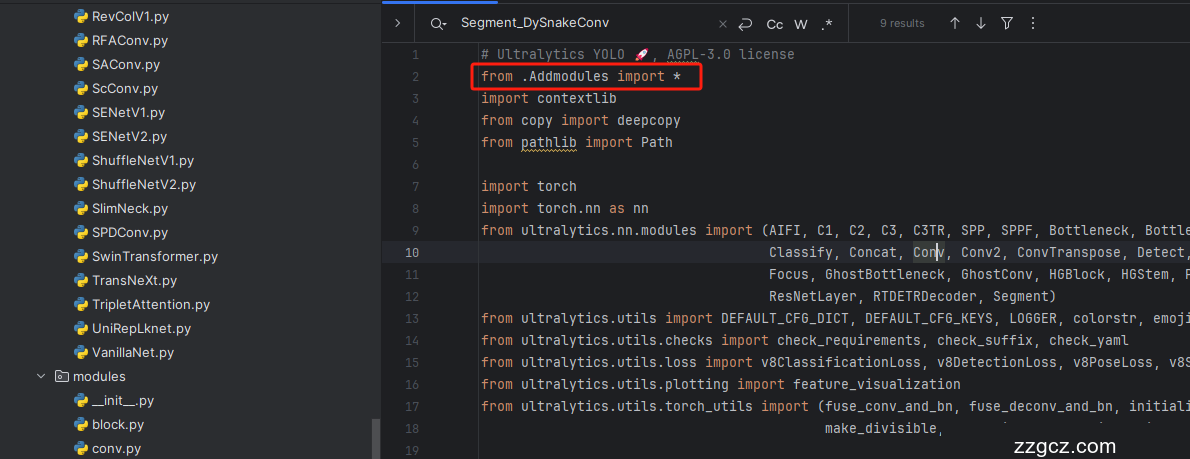
第三步我门中到如下文件'ultralytics/nn/tasks.py'进行导入和注册我们的模块( 用群内的文件的话已经有了无需重新导入直接开始第四步即可) !
从今天开始以后的教程就都统一成这个样子了,因为我默认大家用了我群内的文件来进行修改!!
6.4 修改四
按照我的添加在parse_model里添加即可。

七、DSConv的yaml文件和运行记录
7.1 DSConv的yaml文件
此版本的训练信息:YOLO11-C3k2-DSConv summary: 416 layers, 2,905,271 parameters, 2,905,255 gradients, 6.7 GFLOPs
改进说明在特征提取时用DSConv,在辅助特征融合时换回原先的Bottleneck
- # Ultralytics YOLO 🚀, AGPL-3.0 license
- # YOLOv8 object detection model with P3-P5 outputs. For Usage examples see https://docs.ultralytics.com/tasks/detect
- # Parameters
- nc: 80 # number of classes
- scales: # model compound scaling constants, i.e. 'model=yolov8n.yaml' will call yolov8.yaml with scale 'n'
- # [depth, width, max_channels]
- n: [0.33, 0.25, 1024] # YOLOv8n summary: 225 layers, 3157200 parameters, 3157184 gradients, 8.9 GFLOPs
- s: [0.33, 0.50, 1024] # YOLOv8s summary: 225 layers, 11166560 parameters, 11166544 gradients, 28.8 GFLOPs
- m: [0.67, 0.75, 768] # YOLOv8m summary: 295 layers, 25902640 parameters, 25902624 gradients, 79.3 GFLOPs
- l: [1.00, 1.00, 512] # YOLOv8l summary: 365 layers, 43691520 parameters, 43691504 gradients, 165.7 GFLOPs
- x: [1.00, 1.25, 512] # YOLOv8x summary: 365 layers, 68229648 parameters, 68229632 gradients, 258.5 GFLOPs
- # YOLOv8.0n backbone
- backbone:
- # [from, repeats, module, args]
- - [-1, 1, Conv, [64, 3, 2]] # 0-P1/2
- - [-1, 1, Conv, [128, 3, 2]] # 1-P2/4
- - [-1, 3, C2f_DSConv, [128, True]]
- - [-1, 1, Conv, [256, 3, 2]] # 3-P3/8
- - [-1, 6, C2f_DSConv, [256, True]]
- - [-1, 1, Conv, [512, 3, 2]] # 5-P4/16
- - [-1, 6, C2f_DSConv, [512, True]]
- - [-1, 1, Conv, [1024, 3, 2]] # 7-P5/32
- - [-1, 3, C2f_DSConv, [1024, True]]
- - [-1, 1, SPPF, [1024, 5]] # 9
- # YOLOv8.0n head
- head:
- - [-1, 1, nn.Upsample, [None, 2, 'nearest']]
- - [[-1, 6], 1, Concat, [1]] # cat backbone P4
- - [-1, 3, C2f, [512]] # 12
- - [-1, 1, nn.Upsample, [None, 2, 'nearest']]
- - [[-1, 4], 1, Concat, [1]] # cat backbone P3
- - [-1, 3, C2f_DSConv, [256]] # 15 (P3/8-small)
- - [-1, 1, Conv, [256, 3, 2]]
- - [[-1, 12], 1, Concat, [1]] # cat head P4
- - [-1, 3, C2f_DSConv, [512]] # 18 (P4/16-medium)
- - [-1, 1, Conv, [512, 3, 2]]
- - [[-1, 9], 1, Concat, [1]] # cat head P5
- - [-1, 3, C2f_DSConv, [1024]] # 21 (P5/32-large)
- - [[15, 18, 21], 1, Detect, [nc]] # Detect(P3, P4, P5)
7.2 DSConv的训练过程截图
下面是添加了 DSConv 的训练截图。

八、本文总结
到此本文的正式分享内容就结束了,在这里给大家推荐我的YOLOv11改进有效涨点专栏,本专栏目前为新开的平均质量分98分,后期我会根据各种最新的前沿顶会进行论文复现,也会对一些老的改进机制进行补充,如果大家觉得本文帮助到你了,订阅本专栏,关注后续更多的更新~
