一、 本文介绍
本文给大家带来的改进机制是一种号称超 轻量级 且有效的动态上采样器—— DySample 。与传统的基于内核的动态上采样器相比,DySample采用了一种基于点采样的方法,相比于以前的基于内核的动态上采样器,DySample具有更少的参数、浮点运算次数、 GPU 内存和延迟。此外,DySample在包括语义分割、目标检测、实例分割、全景分割和单目深度估计在内的五个预测任务中, 性能 均优于其他上采样器 (截至目前最有效的上采样算子), 本文将通过介绍其主要原理后,提供该机制的代码和修改教程,并附上运行的yaml文件和运行代码,小白也可轻松上手 。
欢迎大家订阅我的专栏一起学习YOLO!

二、 Dysample的核心原理

官方代码地址: 官方代码地址点击即可跳转
官方论文地址: 官方论文地址点击即可跳转

Dysample是一种创新的动态上采样器。Dysample主要采用点重采样的方法,而非传统的基于内核的方法,这不仅提高了资源效率,而且简化了在PyTorch中的实现。通过避免耗时的动态卷积和额外的子网络生成动态内核,Dysample显著减少了计算工作量和延迟。它的轻量特性,以及更少的参数和较低的GPU内存需求,使其高度高效。值得注意的是,Dysample在多个密集预测任务中,包括语义分割和目标检测等,表现优于其他上采样器,展示了其在多样化应用中的通用性和有效性。
Dysample的主要改进点可以用总结如下:
1. 避开动态卷积: Dysample没有使用复杂的动态卷积处理,这减少了大量计算负担和时间。
2. 点采样方法: 它通过点采样而不是传统的内核方法来实现上采样,这样做更简单、更高效。
3. 更少的参数和内存需求: 相比以往的方法,Dysample需要更少的参数,减少了GPU的内存需求,这意味着它更轻量级,运行更快。
总结: Dysample通过创新的点采样方法,在保持高效率的同时,提升了处理速度和应用范围。

这幅图展示了Dysample中基于采样的动态上采样和模块设计。 图示中涵盖了两个主要部分:
1. 基于采样的动态上采样(图a): 这部分展示了如何从输入特征(X)通过采样点 生成器 创建采样集(S),然后利用grid_sample函数对输入特征进行重新采样,得到上采样特征(X')。
2. Dysample中的采样点生成器(图b) :这里详细描绘了生成采样点的两种方法:静态范围因子和动态范围因子。
- 静态范围因子: 通过线性层和像素洗牌技术(pixel shuffle)结合固定的范围因子来生成偏移量(O),然后与原始网格位置(G)相加得到采样集(S)。
- 动态范围因子: 除了线性层和像素洗牌,还引入了动态范围因子,首先生成一个范围因子,然后用它来调节偏移量(O)。这里的σ表示Sigmoid函数,用于生成范围因子。
总结: 图中详细描述了Dysample实现动态上采样的过程和技术细节,强调了采样点生成的静态和动态方法对最终上采样特征的影响。
三、 Dysample的核心代码
代码的使用方式看章节四!
- import torch
- import torch.nn as nn
- import torch.nn.functional as F
- __all__ = ['Dy_Sample']
- def normal_init(module, mean=0, std=1, bias=0):
- if hasattr(module, 'weight') and module.weight is not None:
- nn.init.normal_(module.weight, mean, std)
- if hasattr(module, 'bias') and module.bias is not None:
- nn.init.constant_(module.bias, bias)
- def constant_init(module, val, bias=0):
- if hasattr(module, 'weight') and module.weight is not None:
- nn.init.constant_(module.weight, val)
- if hasattr(module, 'bias') and module.bias is not None:
- nn.init.constant_(module.bias, bias)
- class Dy_Sample(nn.Module):
- def __init__(self, in_channels, scale=2, style='lp', groups=4, dyscope=False):
- super().__init__()
- self.scale = scale
- self.style = style
- self.groups = groups
- assert style in ['lp', 'pl']
- if style == 'pl':
- assert in_channels >= scale ** 2 and in_channels % scale ** 2 == 0
- assert in_channels >= groups and in_channels % groups == 0
- if style == 'pl':
- in_channels = in_channels // scale ** 2
- out_channels = 2 * groups
- else:
- out_channels = 2 * groups * scale ** 2
- self.offset = nn.Conv2d(in_channels, out_channels, 1)
- normal_init(self.offset, std=0.001)
- if dyscope:
- self.scope = nn.Conv2d(in_channels, out_channels, 1)
- constant_init(self.scope, val=0.)
- self.register_buffer('init_pos', self._init_pos())
- def _init_pos(self):
- h = torch.arange((-self.scale + 1) / 2, (self.scale - 1) / 2 + 1) / self.scale
- return torch.stack(torch.meshgrid([h, h])).transpose(1, 2).repeat(1, self.groups, 1).reshape(1, -1, 1, 1)
- def sample(self, x, offset):
- B, _, H, W = offset.shape
- offset = offset.view(B, 2, -1, H, W)
- coords_h = torch.arange(H) + 0.5
- coords_w = torch.arange(W) + 0.5
- coords = torch.stack(torch.meshgrid([coords_w, coords_h])
- ).transpose(1, 2).unsqueeze(1).unsqueeze(0).type(x.dtype).to(x.device)
- normalizer = torch.tensor([W, H], dtype=x.dtype, device=x.device).view(1, 2, 1, 1, 1)
- coords = 2 * (coords + offset) / normalizer - 1
- coords = F.pixel_shuffle(coords.view(B, -1, H, W), self.scale).view(
- B, 2, -1, self.scale * H, self.scale * W).permute(0, 2, 3, 4, 1).contiguous().flatten(0, 1)
- return F.grid_sample(x.reshape(B * self.groups, -1, H, W), coords, mode='bilinear',
- align_corners=False, padding_mode="border").view(B, -1, self.scale * H, self.scale * W)
- def forward_lp(self, x):
- if hasattr(self, 'scope'):
- offset = self.offset(x) * self.scope(x).sigmoid() * 0.5 + self.init_pos
- else:
- offset = self.offset(x) * 0.25 + self.init_pos
- return self.sample(x, offset)
- def forward_pl(self, x):
- x_ = F.pixel_shuffle(x, self.scale)
- if hasattr(self, 'scope'):
- offset = F.pixel_unshuffle(self.offset(x_) * self.scope(x_).sigmoid(), self.scale) * 0.5 + self.init_pos
- else:
- offset = F.pixel_unshuffle(self.offset(x_), self.scale) * 0.25 + self.init_pos
- return self.sample(x, offset)
- def forward(self, x):
- if self.style == 'pl':
- return self.forward_pl(x)
- return self.forward_lp(x)
- if __name__ == '__main__':
- x = torch.rand(2, 64, 4, 7)
- dys = Dy_Sample(64)
- print(dys(x).shape)
四、 手把手教你添加Dysample机制
这个添加方式和之前的变了一下,以后的添加方法都按照这个来了,是为了和群内的文件适配。
4.1 修改一
第一还是建立文件,我们找到如下 ultralytics /nn/modules文件夹下建立一个目录名字呢就是'Addmodules'文件夹( 用群内的文件的话已经有了无需新建) !然后在其内部建立一个新的py文件将核心代码复制粘贴进去即可。

4.2 修改二
第二步我们在该目录下创建一个新的py文件名字为'__init__.py'( 用群内的文件的话已经有了无需新建) ,然后在其内部导入我们的检测头如下图所示。

4.3 修改三
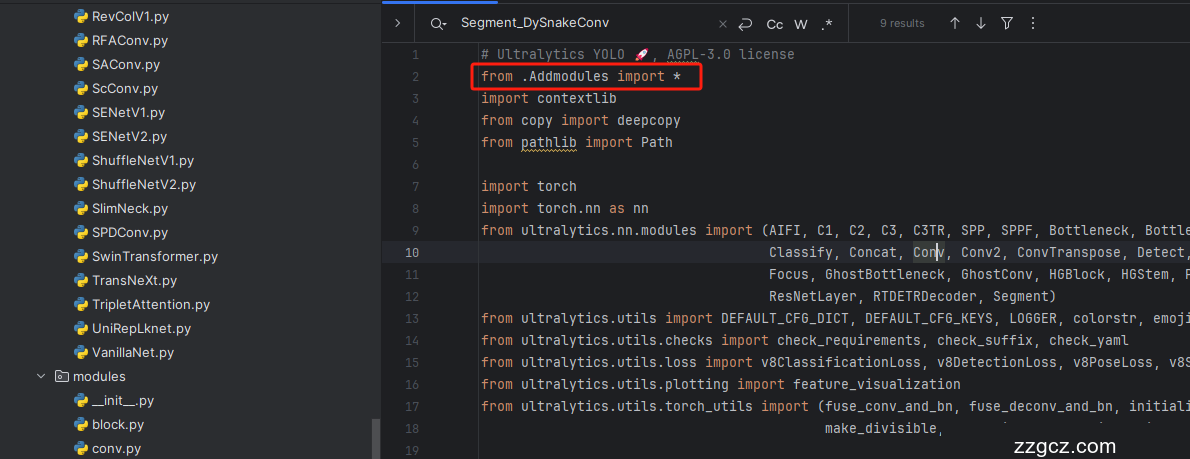
第三步我门中到如下文件'ultralytics/nn/tasks.py'进行导入和注册我们的模块( 用群内的文件的话已经有了无需重新导入直接开始第四步即可) !
从今天开始以后的教程就都统一成这个样子了,因为我默认大家用了我群内的文件来进行修改!!
4.4 修改四
按照我的添加在parse_model里添加即可。

- elif m in {Dy_Sample}:
- c2 = ch[f]
- args = [c2, *args]
到此就修改完成了,大家可以复制下面的yaml文件运行。
五、Dysample的yaml文件和运行记录
5.1 Dysample的yaml文件
此版本训练信息:YOLO11-Dysample summary: 321 layers, 2,607,067 parameters, 2,607,051 gradients, 6.5 GFLOPs
- # Ultralytics YOLO 🚀, AGPL-3.0 license
- # YOLO11 object detection model with P3-P5 outputs. For Usage examples see https://docs.ultralytics.com/tasks/detect
- # Parameters
- nc: 80 # number of classes
- scales: # model compound scaling constants, i.e. 'model=yolo11n.yaml' will call yolo11.yaml with scale 'n'
- # [depth, width, max_channels]
- n: [0.50, 0.25, 1024] # summary: 319 layers, 2624080 parameters, 2624064 gradients, 6.6 GFLOPs
- s: [0.50, 0.50, 1024] # summary: 319 layers, 9458752 parameters, 9458736 gradients, 21.7 GFLOPs
- m: [0.50, 1.00, 512] # summary: 409 layers, 20114688 parameters, 20114672 gradients, 68.5 GFLOPs
- l: [1.00, 1.00, 512] # summary: 631 layers, 25372160 parameters, 25372144 gradients, 87.6 GFLOPs
- x: [1.00, 1.50, 512] # summary: 631 layers, 56966176 parameters, 56966160 gradients, 196.0 GFLOPs
- # YOLO11n backbone
- backbone:
- # [from, repeats, module, args]
- - [-1, 1, Conv, [64, 3, 2]] # 0-P1/2
- - [-1, 1, Conv, [128, 3, 2]] # 1-P2/4
- - [-1, 2, C3k2, [256, False, 0.25]]
- - [-1, 1, Conv, [256, 3, 2]] # 3-P3/8
- - [-1, 2, C3k2, [512, False, 0.25]]
- - [-1, 1, Conv, [512, 3, 2]] # 5-P4/16
- - [-1, 2, C3k2, [512, True]]
- - [-1, 1, Conv, [1024, 3, 2]] # 7-P5/32
- - [-1, 2, C3k2, [1024, True]]
- - [-1, 1, SPPF, [1024, 5]] # 9
- - [-1, 2, C2PSA, [1024]] # 10
- # YOLO11n head
- head:
- - [-1, 1, Dy_Sample, [2, "lp"]] # lp nl 两种方法
- - [[-1, 6], 1, Concat, [1]] # cat backbone P4
- - [-1, 2, C3k2, [512, False]] # 13
- - [-1, 1, Dy_Sample, [2, "lp"]] # lp nl 两种方法
- - [[-1, 4], 1, Concat, [1]] # cat backbone P3
- - [-1, 2, C3k2, [256, False]] # 16 (P3/8-small)
- - [-1, 1, Conv, [256, 3, 2]]
- - [[-1, 13], 1, Concat, [1]] # cat head P4
- - [-1, 2, C3k2, [512, False]] # 19 (P4/16-medium)
- - [-1, 1, Conv, [512, 3, 2]]
- - [[-1, 10], 1, Concat, [1]] # cat head P5
- - [-1, 2, C3k2, [1024, True]] # 22 (P5/32-large)
- - [[16, 19, 22], 1, Detect, [nc]] # Detect(P3, P4, P5)
5.2 训练代码
大家可以创建一个py文件将我给的代码复制粘贴进去,配置好自己的文件路径即可运行。
- import warnings
- warnings.filterwarnings('ignore')
- from ultralytics import YOLO
- if __name__ == '__main__':
- model = YOLO('替换你的yaml文件地址')
- # model.load('yolov8n.pt') # loading pretrain weights
- model.train(data=r'替换你的数据集地址即可',
- # 如果大家任务是其它的'ultralytics/cfg/default.yaml'找到这里修改task可以改成detect, segment, classify, pose
- cache=False,
- imgsz=640,
- epochs=150,
- single_cls=False, # 是否是单类别检测
- batch=4,
- close_mosaic=10,
- workers=0,
- device='0',
- optimizer='SGD', # using SGD
- # resume='', # 如过想续训就设置last.pt的地址
- amp=False, # 如果出现训练损失为Nan可以关闭amp
- project='runs/train',
- name='exp',
- )
5.3 Dysample的训练过程截图

五、本文总结
到此本文的正式分享内容就结束了,在这里给大家推荐我的YOLOv11改进有效涨点专栏,本专栏目前为新开的平均质量分98分,后期我会根据各种最新的前沿顶会进行论文复现,也会对一些老的改进机制进行补充,如果大家觉得本文帮助到你了,订阅本专栏,关注后续更多的更新~