一、本文介绍
本文给大家带来的改进机制是华为移动端模型 Ghostnetv1 ,华为的 GhostNet 是一种轻量级 卷积神经网络 ,旨在在计算资源有限的 嵌入式设备 上实现高性能的图像分类。 GhostNet的关键思想 在于通过引入Ghost模块,以较低的计算成本增加了特征图的数量,从而提高了模型的性能。这种方法在计算资源有限的情况下,尤其适用于图像分类任务,并在一些基准测试中表现出了很好的性能。 本文将通过首先介绍其主要原理,然后手把手教大家如何使用该网络结构改进我们的特征提取网络。 欢迎大家订阅本专栏,本专栏每周更新3-5篇最新机制,更有包含我所有改进的文件和交流群提供给大家。
欢迎大家订阅我的专栏一起学习YOLO!

二、 GhostNet 卷积原理

论文地址: 官方论文地址
代码地址: 官方代码地址

2.1 GhostNet的基本原理
华为的 GhostNet 是一种轻量级卷积 神经网络 ,旨在在计算资源有限的嵌入式设备上实现高性能的图像分类。GhostNet的 基本原理 包括以下关键概念:
1. Ghost Module(幽灵模块): GhostNet引入了Ghost模块,这是其核心 组件 。Ghost模块的主要目标是生成更多的特征图,而不会增加过多的计算负担。Ghost模块的设计允许在特征图中引入额外的信息,以提高模型性能。
2. 线性变换: Ghost模块通过应用一系列廉价的线性变换(例如,卷积和标准化)来生成所谓的“幽灵”特征图。这些变换具有较低的计算成本,但可以生成额外的特征图,以丰富模型的表示能力。
3. Ghost Bottlenecks: 为了构建GhostNet,可以堆叠多个Ghost模块,形成所谓的Ghost Bottlenecks。这样可以创建深度轻量级网络,适用于嵌入式设备和移动应用。
GhostNet的关键思想 在于通过引入Ghost模块,以较低的计算成本增加了特征图的数量,从而提高了模型的性能。这种方法在计算资源有限的情况下,尤其适用于图像分类任务,并在一些基准测试中表现出了很好的性能。
2.2 Ghost Module
GhostNet中的 Ghost Module(幽灵模块) 是该网络的关键组件之一,旨在以低计算成本生成更多的特征图,从而提高模型的性能。以下是Ghost Module的 主要特点和原理 :
1. 生成额外特征图: Ghost Module的主要目标是生成额外的特征图,而不会增加大量的计算负担。这些额外的特征图有助于丰富模型的表示能力,提高图像分类性能。
2. 线性变换: Ghost Module使用一系列线性变换来生成这些额外的特征图。这些线性变换通常包括卷积和其他简单的操作,其计算成本远低于传统的卷积操作。这些线性操作 Φ 作用于每个通道,从而生成更多的特征图。
3. 输出特征图: Ghost Module的输出数据Y包括了生成的n个特征图,其中n = m · s,m是Ghost Module输入数据的通道数,s是线性变换的数量。这些特征图可以用于后续的任务,如图像分类。
4. 多种线性操作: 在实际应用中,Ghost Module可以包含多种不同的线性操作,例如3×3和5×5的线性核。这些不同的操作可以在实验中进行分析和比较,以确定哪种操作在特定任务上表现最佳。
下图对比了 卷积层和提出的Ghost模块:

可以看出Ghost模块与现有的高效卷积方案 存在以下差异 :
i) 与1×1逐点卷积单元相比,Ghost模块中的主要卷积可以具有 自定义的核大小 。
ii) 现有方法采用逐点卷积来处理跨通道的特征,然后采用深度卷积来处理空间信息。相比之下,Ghost模块采用 普通卷积 首先生成一些内在特征图,然后利用 廉价的线性操作 来增强特征并增加通道数。
iii) 处理每个特征图的操作在先前的高效架构中通常限于深度卷积或移位操作,而Ghost模块中的线性操作可以具有较大的 多样性 。
iv) 此外,在Ghost模块中, 恒等映射与线性变换并行使用 ,以保留内在特征图。
总结: GhostNet中的Ghost Module是一种旨在以低计算成本生成更多特征图的创新组件。它通过引入额外的特征图,丰富了模型的表示能力,提高了性能,特别适用于在计算资源有限的环境中实现高性能的图像分类模型。
2.3 线性变换
GhostNet中的 线性变换 用于 生成幽灵特征图 。Ghost Module通过一系列 廉价的线性变换 来增强模型的表示能力。
我总结其 主要特点和原理 如下:
1. 应用于内在特征: 线性变换是应用于Ghost Module中已生成的内在特征图(Intrinsic Feature Maps)的。这些内在特征图是由主要卷积操作生成的,通常包含有限数量的特征。
2. 生成幽灵特征: 每个内在特征图都会经过一系列线性变换,以生成幽灵特征图。这些幽灵特征图是额外生成的,用于丰富模型的特征表示。
3. 自定义操作: Ghost Module中的线性操作可以具有不同的形式,例如3×3和5×5的线性核。这些不同的操作允许模型根据任务的需要自定义特征生成过程。
5. 保留内在特征: Ghost Module中的最后一个线性变换通常是恒等映射,用于保留内在特征。这确保了生成的幽灵特征与原始特征之间的一致性。
总结: GhostNet中的线性变换是为了通过低成本的操作生成额外的特征,从而提高模型的性能。这种方法在计算资源受限的情况下尤其有用,可以帮助模型更好地处理图像分类等任务。Ghost Module中的线性操作具有灵活性,可以根据具体任务进行调整和优化。
2.4 Ghost Bottlenecks
GhostNet的 Ghost Bottlenecks(幽灵瓶颈) 专门为 小型卷积神经网络(CNNs) 设计。Ghost Bottlenecks采用了Ghost Module的概念,并结合了 残差块的思想 ,用于提高模型的性能。
GhostNet中Ghost Bottlenecks的 主要特点:
1. 模块组成: Ghost Bottlenecks主要由两个堆叠的Ghost模块组成。这些Ghost模块在Ghost Bottleneck内进行堆叠,以实现更强大的特征提取和表示。
2. 扩展层: 第一个Ghost模块充当扩展层,其主要功能是增加通道数。这个扩展层通过增加通道数来增强特征的表示能力,从而有助于提高模型性能。
3. 收缩层: 第二个Ghost模块充当收缩层,其主要功能是减少通道数,以与快捷路径匹配。这个步骤有助于控制模型的复杂性,并确保模型在不增加计算负担的情况下能够保持高性能。
4. 快捷连接: Ghost Bottlenecks中还包括快捷连接,它连接在两个Ghost模块的输入和输出之间。这种连接有助于信息的传递和梯度的流动,以更好地训练模型。
5. 非线性激活: 在每个Ghost Bottleneck内部,都应用批归一化(BN)和ReLU非线性激活 函数 。但是,根据MobileNetV2的建议,在第二个Ghost模块之后不使用ReLU。
接下来为大家展示 Ghost瓶颈(G-bneck)示意图:
(左边:步幅为1的Ghost瓶颈;右边:步幅为2的Ghost瓶颈)

Ghost瓶颈在外观上与ResNe中的基本残差块类似,其中集成了多个卷积层和快捷连接。
Ghost瓶颈主要由 两个堆叠的Ghost模块 组成。
第一个Ghost模块 充当扩展层,增加通道数。我们将输出通道数与输入通道数之间的比率称为扩展比。
第二个Ghost模块 将通道数减少以匹配快捷路径。然后,将快捷连接连接在这两个Ghost模块的输入和输出之间。在每个层之后都应用批归一化(BN)和ReLU非线性激活函数(但是根据MobileNetV2的建议,在第二个Ghost模块后不使用ReLU。)
总结: Ghost Bottlenecks的设计旨在在小型CNNs中提高性能,并通过Ghost Module的低成本特性减少计算开销。这使得GhostNet成为在计算资源有限的嵌入式设备上实现高性能图像分类的有力选择。 Ghost Bottlenecks的堆叠增加了模型的深度,从而提高了特征的抽象能力,有助于更好地适应各种视觉任务。
三、 GhsetNetV1的核心代码
代码的使用方式看章节四!
- import torch
- import torch.nn as nn
- import torch.nn.functional as F
- import math
- __all__ = ['Ghostnetv1']
- def _make_divisible(v, divisor, min_value=None):
- """
- This function is taken from the original tf repo.
- It ensures that all layers have a channel number that is divisible by 8
- It can be seen here:
- https://github.com/tensorflow/models/blob/master/research/slim/nets/mobilenet/mobilenet.py
- """
- if min_value is None:
- min_value = divisor
- new_v = max(min_value, int(v + divisor / 2) // divisor * divisor)
- # Make sure that round down does not go down by more than 10%.
- if new_v < 0.9 * v:
- new_v += divisor
- return new_v
- def hard_sigmoid(x, inplace: bool = False):
- if inplace:
- return x.add_(3.).clamp_(0., 6.).div_(6.)
- else:
- return F.relu6(x + 3.) / 6.
- class SqueezeExcite(nn.Module):
- def __init__(self, in_chs, se_ratio=0.25, reduced_base_chs=None,
- act_layer=nn.ReLU, gate_fn=hard_sigmoid, divisor=4, **_):
- super(SqueezeExcite, self).__init__()
- self.gate_fn = gate_fn
- reduced_chs = _make_divisible((reduced_base_chs or in_chs) * se_ratio, divisor)
- self.avg_pool = nn.AdaptiveAvgPool2d(1)
- self.conv_reduce = nn.Conv2d(in_chs, reduced_chs, 1, bias=True)
- self.act1 = act_layer(inplace=True)
- self.conv_expand = nn.Conv2d(reduced_chs, in_chs, 1, bias=True)
- def forward(self, x):
- x_se = self.avg_pool(x)
- x_se = self.conv_reduce(x_se)
- x_se = self.act1(x_se)
- x_se = self.conv_expand(x_se)
- x = x * self.gate_fn(x_se)
- return x
- class ConvBnAct(nn.Module):
- def __init__(self, in_chs, out_chs, kernel_size,
- stride=1, act_layer=nn.ReLU):
- super(ConvBnAct, self).__init__()
- self.conv = nn.Conv2d(in_chs, out_chs, kernel_size, stride, kernel_size//2, bias=False)
- self.bn1 = nn.BatchNorm2d(out_chs)
- self.act1 = act_layer(inplace=True)
- def forward(self, x):
- x = self.conv(x)
- x = self.bn1(x)
- x = self.act1(x)
- return x
- class GhostModule(nn.Module):
- def __init__(self, inp, oup, kernel_size=1, ratio=2, dw_size=3, stride=1, relu=True):
- super(GhostModule, self).__init__()
- self.oup = oup
- init_channels = math.ceil(oup / ratio)
- new_channels = init_channels*(ratio-1)
- self.primary_conv = nn.Sequential(
- nn.Conv2d(inp, init_channels, kernel_size, stride, kernel_size//2, bias=False),
- nn.BatchNorm2d(init_channels),
- nn.ReLU(inplace=True) if relu else nn.Sequential(),
- )
- self.cheap_operation = nn.Sequential(
- nn.Conv2d(init_channels, new_channels, dw_size, 1, dw_size//2, groups=init_channels, bias=False),
- nn.BatchNorm2d(new_channels),
- nn.ReLU(inplace=True) if relu else nn.Sequential(),
- )
- def forward(self, x):
- x1 = self.primary_conv(x)
- x2 = self.cheap_operation(x1)
- out = torch.cat([x1,x2], dim=1)
- return out[:,:self.oup,:,:]
- class GhostBottleneck(nn.Module):
- """ Ghost bottleneck w/ optional SE"""
- def __init__(self, in_chs, mid_chs, out_chs, dw_kernel_size=3,
- stride=1, act_layer=nn.ReLU, se_ratio=0.):
- super(GhostBottleneck, self).__init__()
- has_se = se_ratio is not None and se_ratio > 0.
- self.stride = stride
- # Point-wise expansion
- self.ghost1 = GhostModule(in_chs, mid_chs, relu=True)
- # Depth-wise convolution
- if self.stride > 1:
- self.conv_dw = nn.Conv2d(mid_chs, mid_chs, dw_kernel_size, stride=stride,
- padding=(dw_kernel_size-1)//2,
- groups=mid_chs, bias=False)
- self.bn_dw = nn.BatchNorm2d(mid_chs)
- # Squeeze-and-excitation
- if has_se:
- self.se = SqueezeExcite(mid_chs, se_ratio=se_ratio)
- else:
- self.se = None
- # Point-wise linear projection
- self.ghost2 = GhostModule(mid_chs, out_chs, relu=False)
- # shortcut
- if (in_chs == out_chs and self.stride == 1):
- self.shortcut = nn.Sequential()
- else:
- self.shortcut = nn.Sequential(
- nn.Conv2d(in_chs, in_chs, dw_kernel_size, stride=stride,
- padding=(dw_kernel_size-1)//2, groups=in_chs, bias=False),
- nn.BatchNorm2d(in_chs),
- nn.Conv2d(in_chs, out_chs, 1, stride=1, padding=0, bias=False),
- nn.BatchNorm2d(out_chs),
- )
- def forward(self, x):
- residual = x
- # 1st ghost bottleneck
- x = self.ghost1(x)
- # Depth-wise convolution
- if self.stride > 1:
- x = self.conv_dw(x)
- x = self.bn_dw(x)
- # Squeeze-and-excitation
- if self.se is not None:
- x = self.se(x)
- # 2nd ghost bottleneck
- x = self.ghost2(x)
- x += self.shortcut(residual)
- return x
- class GhostNet(nn.Module):
- def __init__(self, cfgs, num_classes=1000, width=1.0, dropout=0.2):
- super(GhostNet, self).__init__()
- # setting of inverted residual blocks
- self.cfgs = cfgs
- self.dropout = dropout
- # building first layer
- output_channel = _make_divisible(16 * width, 4)
- self.conv_stem = nn.Conv2d(3, output_channel, 3, 2, 1, bias=False)
- self.bn1 = nn.BatchNorm2d(output_channel)
- self.act1 = nn.ReLU(inplace=True)
- input_channel = output_channel
- # building inverted residual blocks
- stages = []
- block = GhostBottleneck
- for cfg in self.cfgs:
- layers = []
- for k, exp_size, c, se_ratio, s in cfg:
- output_channel = _make_divisible(c * width, 4)
- hidden_channel = _make_divisible(exp_size * width, 4)
- layers.append(block(input_channel, hidden_channel, output_channel, k, s,
- se_ratio=se_ratio))
- input_channel = output_channel
- stages.append(nn.Sequential(*layers))
- output_channel = _make_divisible(exp_size * width, 4)
- stages.append(nn.Sequential(ConvBnAct(input_channel, output_channel, 1)))
- input_channel = output_channel
- self.blocks = nn.Sequential(*stages)
- self.width_list = [i.size(1) for i in self.forward(torch.randn(1, 3, 640, 640))]
- def forward(self, x):
- unique_tensors = {}
- x = self.conv_stem(x)
- x = self.bn1(x)
- x = self.act1(x)
- for model in self.blocks:
- x = model(x)
- if self.dropout > 0.:
- x = F.dropout(x, p=self.dropout, training=self.training)
- width, height = x.shape[2], x.shape[3]
- unique_tensors[(width, height)] = x
- result_list = list(unique_tensors.values())[-4:]
- return result_list
- def Ghostnetv1(**kwargs):
- """
- Constructs a GhostNet model
- """
- cfgs = [
- # k, t, c, SE, s
- # stage1
- [[3, 16, 16, 0, 1]],
- # stage2
- [[3, 48, 24, 0, 2]],
- [[3, 72, 24, 0, 1]],
- # stage3
- [[5, 72, 40, 0.25, 2]],
- [[5, 120, 40, 0.25, 1]],
- # stage4
- [[3, 240, 80, 0, 2]],
- [[3, 200, 80, 0, 1],
- [3, 184, 80, 0, 1],
- [3, 184, 80, 0, 1],
- [3, 480, 112, 0.25, 1],
- [3, 672, 112, 0.25, 1]
- ],
- # stage5
- [[5, 672, 160, 0.25, 2]],
- [[5, 960, 160, 0, 1],
- [5, 960, 160, 0.25, 1],
- [5, 960, 160, 0, 1],
- [5, 960, 160, 0.25, 1]
- ]
- ]
- return GhostNet(cfgs, **kwargs)
- if __name__=='__main__':
- model = Ghostnetv1()
- model.eval()
- input = torch.randn(16,3,224,224)
- y = model(input)
- print(y.size())
四、手把手教你添加GhsetNetV1
4.1 修改一
第一步还是建立文件,我们找到如下ultralytics/nn文件夹下建立一个目录名字呢就是'Addmodules'文件夹( 用群内的文件的话已经有了无需新建) !然后在其内部建立一个新的py文件将核心代码复制粘贴进去即可

4.2 修改二
第二步我们在该目录下创建一个新的py文件名字为'__init__.py'( 用群内的文件的话已经有了无需新建) ,然后在其内部导入我们的检测头如下图所示。

4.3 修改三
第三步我门中到如下文件'ultralytics/nn/tasks.py'进行导入和注册我们的模块( 用群内的文件的话已经有了无需重新导入直接开始第四步即可) !
从今天开始以后的教程就都统一成这个样子了,因为我默认大家用了我群内的文件来进行修改!!
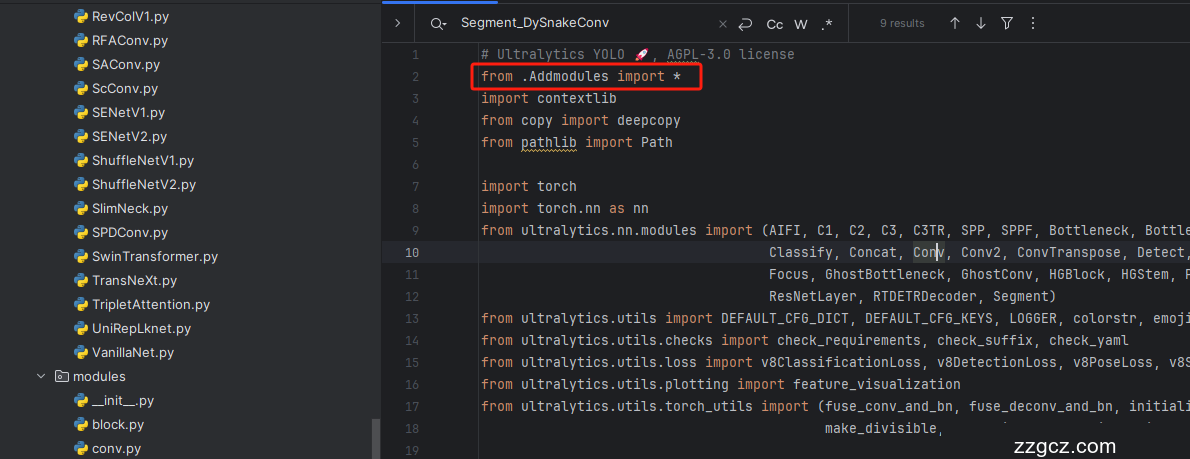
4.4 修改四
添加如下两行代码!!!

4.5 修改五
找到七百多行大概把具体看图片,按照图片来修改就行,添加红框内的部分,注意没有()只是函数名。

- elif m in {自行添加对应的模型即可,下面都是一样的}:
- m = m(*args)
- c2 = m.width_list # 返回通道列表
- backbone = True
4.6 修改六
下面的两个红框内都是需要改动的。

- if isinstance(c2, list):
- m_ = m
- m_.backbone = True
- else:
- m_ = nn.Sequential(*(m(*args) for _ in range(n))) if n > 1 else m(*args) # module
- t = str(m)[8:-2].replace('__main__.', '') # module type
- m.np = sum(x.numel() for x in m_.parameters()) # number params
- m_.i, m_.f, m_.type = i + 4 if backbone else i, f, t # attach index, 'from' index, type
4.7 修改七
修改七和前面的都不太一样,需要修改前向传播中的一个部分, 已经离开了parse_model方法了。
可以在图片中开代码行数,没有离开task.py文件都是同一个文件。 同时这个部分有好几个前向传播都很相似,大家不要看错了, 是70多行左右的!!!,同时我后面提供了代码,大家直接复制粘贴即可,有时间我针对这里会出一个视频。

代码如下->
- def _predict_once(self, x, profile=False, visualize=False, embed=None):
- """
- Perform a forward pass through the network.
- Args:
- x (torch.Tensor): The input tensor to the model.
- profile (bool): Print the computation time of each layer if True, defaults to False.
- visualize (bool): Save the feature maps of the model if True, defaults to False.
- embed (list, optional): A list of feature vectors/embeddings to return.
- Returns:
- (torch.Tensor): The last output of the model.
- """
- y, dt, embeddings = [], [], [] # outputs
- for m in self.model:
- if m.f != -1: # if not from previous layer
- x = y[m.f] if isinstance(m.f, int) else [x if j == -1 else y[j] for j in m.f] # from earlier layers
- if profile:
- self._profile_one_layer(m, x, dt)
- if hasattr(m, 'backbone'):
- x = m(x)
- if len(x) != 5: # 0 - 5
- x.insert(0, None)
- for index, i in enumerate(x):
- if index in self.save:
- y.append(i)
- else:
- y.append(None)
- x = x[-1] # 最后一个输出传给下一层
- else:
- x = m(x) # run
- y.append(x if m.i in self.save else None) # save output
- if visualize:
- feature_visualization(x, m.type, m.i, save_dir=visualize)
- if embed and m.i in embed:
- embeddings.append(nn.functional.adaptive_avg_pool2d(x, (1, 1)).squeeze(-1).squeeze(-1)) # flatten
- if m.i == max(embed):
- return torch.unbind(torch.cat(embeddings, 1), dim=0)
- return x
到这里就完成了修改部分,但是这里面细节很多,大家千万要注意不要替换多余的代码,导致报错,也不要拉下任何一部,都会导致运行失败,而且报错很难排查!!!很难排查!!!
注意!!! 额外的修改!
关注我的其实都知道,我大部分的修改都是一样的,这个网络需要额外的修改一步,就是s一个参数,将下面的s改为640!!!即可完美运行!!

打印计算量问题解决方案
我们找到如下文件'ultralytics/utils/torch_utils.py'按照如下的图片进行修改,否则容易打印不出来计算量。

注意事项!!!
如果大家在验证的时候报错形状不匹配的错误可以固定验证集的图片尺寸,方法如下 ->
找到下面这个文件ultralytics/ models /yolo/detect/train.py然后其中有一个类是DetectionTrainer class中的build_dataset函数中的一个参数rect=mode == 'val'改为rect=False

五、GhsetNetV1的yaml文件
5.1 yaml文件
训练信息:YOLO11-Ghostnetv1 summary: 610 layers, 5,096,511 parameters, 5,096,495 gradients, 6.7 GFLOPs
- # Ultralytics YOLO 🚀, AGPL-3.0 license
- # YOLO11 object detection model with P3-P5 outputs. For Usage examples see https://docs.ultralytics.com/tasks/detect
- # Parameters
- nc: 80 # number of classes
- scales: # model compound scaling constants, i.e. 'model=yolo11n.yaml' will call yolo11.yaml with scale 'n'
- # [depth, width, max_channels]
- n: [0.50, 0.25, 1024] # summary: 319 layers, 2624080 parameters, 2624064 gradients, 6.6 GFLOPs
- s: [0.50, 0.50, 1024] # summary: 319 layers, 9458752 parameters, 9458736 gradients, 21.7 GFLOPs
- m: [0.50, 1.00, 512] # summary: 409 layers, 20114688 parameters, 20114672 gradients, 68.5 GFLOPs
- l: [1.00, 1.00, 512] # summary: 631 layers, 25372160 parameters, 25372144 gradients, 87.6 GFLOPs
- x: [1.00, 1.50, 512] # summary: 631 layers, 56966176 parameters, 56966160 gradients, 196.0 GFLOPs
- # 共四个版本 "mobile_vit_small, mobile_vit_x_small, mobile_vit_xx_small"
- # YOLO11n backbone
- backbone:
- # [from, repeats, module, args]
- - [-1, 1, Ghostnetv1, []] # 0-4 P1/2
- - [-1, 1, SPPF, [1024, 5]] # 5
- - [-1, 2, C2PSA, [1024]] # 6
- # YOLO11n head
- head:
- - [-1, 1, nn.Upsample, [None, 2, "nearest"]]
- - [[-1, 3], 1, Concat, [1]] # cat backbone P4
- - [-1, 2, C3k2, [512, False]] # 9
- - [-1, 1, nn.Upsample, [None, 2, "nearest"]]
- - [[-1, 2], 1, Concat, [1]] # cat backbone P3
- - [-1, 2, C3k2, [256, False]] # 12 (P3/8-small)
- - [-1, 1, Conv, [256, 3, 2]]
- - [[-1, 9], 1, Concat, [1]] # cat head P4
- - [-1, 2, C3k2, [512, False]] # 15 (P4/16-medium)
- - [-1, 1, Conv, [512, 3, 2]]
- - [[-1, 6], 1, Concat, [1]] # cat head P5
- - [-1, 2, C3k2, [1024, True]] # 18 (P5/32-large)
- - [[12, 15, 18], 1, Detect, [nc]] # Detect(P3, P4, P5)
5.2 训练文件的代码
可以复制我的运行文件进行运行。
- import warnings
- warnings.filterwarnings('ignore')
- from ultralytics import YOLO
- if __name__ == '__main__':
- model = YOLO("替换你的yaml文件地址")
- model.load('yolov8n.pt')
- model.train(data=r'你的数据集的地址',
- cache=False,
- imgsz=640,
- epochs=150,
- batch=4,
- close_mosaic=0,
- workers=0,
- device=0,
- optimizer='SGD'
- amp=False,
- )
六、成功运行记录
下面是成功运行的截图,已经完成了有1个epochs的训练,图片太大截不全第2个epochs了。

七、本文总结
到此本文的正式分享内容就结束了,在这里给大家推荐我的YOLOv11改进有效涨点专栏,本专栏目前为新开的平均质量分98分,后期我会根据各种最新的前沿顶会进行论文复现,也会对一些老的改进机制进行补充 , 如果大家觉得本文帮助到你了,订阅本专栏,关注后续更多的更新~
