一、本文介绍
本文给大家带来的改进机制是由北大和北航联合提出的 FFA-net : Feature Fusion Attention Network for Single Image Dehazing 图像增强 去雾网络,该网络的主要思想是利用特征融合注意力网络(Feature Fusion Attention Network)直接恢复无雾图像, FFA-Net通过特征注意力机制和特征融合注意力结构的创新设计 ,有效地提升了单图像去雾技术的性能。通过巧妙地结合通道和像素注意力,以及局部残差学习,网络能够更加精准地处理不同区域的雾霾, 实现了在细节保留和色彩保真度上的显著提升。
欢迎大家订阅我的专栏一起学习YOLO!

二、原理介绍

官方论文地址: 官方论文地址点击此处即可跳转
官方代码地址: 官方代码地址点击此处即可跳转

FFA-Net的主要思想 是利用特征融合注意力网络(Feature Fusion Attention Network )直接恢复无雾图像。这种架构通过三个关键 组件 实现高效的图像去雾效果:
1. 特征注意力(Feature Attention, FA)模块: 结合通道注意力(Channel Attention)和像素注意力(Pixel Attention)机制,因为不同通道的特征包含完全不同的加权信息,且雾的分布在不同的图像像素上是不均匀的。FA通过不平等地对待不同的特征和像素,提供了处理不同信息类型的额外灵活性,从而扩展了 卷积神经网络 的表示能力。
2. 基本块结构: 包含局部残差学习(Local Residual Learning)和特征注意力。局部残差学习允许如轻雾区域或低频等不那么重要的信息通过多个局部残差连接被绕过,使主网络架构可以专注于更有效的信息。
3. 基于注意力的不同级别特征融合(FFA)结构: 通过特征注意力(FA)模块自适应学习的特征权重,给予重要特征更多的权重。这种结构还可以保留浅层的信息,并将其传递到深层。
个人总结:
FFA-Net通过特征注意力机制和特征融合注意力结构的创新设计,有效地提升了单图像去雾技术的性能。通过巧妙地结合通道和像素注意力,以及局部残差学习,网络能够更加精准地处理不同区域的雾霾,实现了在细节保留和色彩保真度上的显著提升。
三、核心代码
核心代码的使用方式看章节四!
- import torch.nn as nn
- import torch
- __all__ = ['FFA']
- def default_conv(in_channels, out_channels, kernel_size, bias=True):
- return nn.Conv2d(in_channels, out_channels, kernel_size, padding=(kernel_size // 2), bias=bias)
- class PALayer(nn.Module):
- def __init__(self, channel):
- super(PALayer, self).__init__()
- self.pa = nn.Sequential(
- nn.Conv2d(channel, channel // 8, 1, padding=0, bias=True),
- nn.ReLU(inplace=True),
- nn.Conv2d(channel // 8, 1, 1, padding=0, bias=True),
- nn.Sigmoid()
- )
- def forward(self, x):
- y = self.pa(x)
- return x * y
- class CALayer(nn.Module):
- def __init__(self, channel):
- super(CALayer, self).__init__()
- self.avg_pool = nn.AdaptiveAvgPool2d(1)
- self.ca = nn.Sequential(
- nn.Conv2d(channel, channel // 8, 1, padding=0, bias=True),
- nn.ReLU(inplace=True),
- nn.Conv2d(channel // 8, channel, 1, padding=0, bias=True),
- nn.Sigmoid()
- )
- def forward(self, x):
- y = self.avg_pool(x)
- y = self.ca(y)
- return x * y
- class Block(nn.Module):
- def __init__(self, conv, dim, kernel_size, ):
- super(Block, self).__init__()
- self.conv1 = conv(dim, dim, kernel_size, bias=True)
- self.act1 = nn.ReLU(inplace=True)
- self.conv2 = conv(dim, dim, kernel_size, bias=True)
- self.calayer = CALayer(dim)
- self.palayer = PALayer(dim)
- def forward(self, x):
- res = self.act1(self.conv1(x))
- res = res + x
- res = self.conv2(res)
- res = self.calayer(res)
- res = self.palayer(res)
- res += x
- return res
- class Group(nn.Module):
- def __init__(self, conv, dim, kernel_size, blocks):
- super(Group, self).__init__()
- modules = [Block(conv, dim, kernel_size) for _ in range(blocks)]
- modules.append(conv(dim, dim, kernel_size))
- self.gp = nn.Sequential(*modules)
- def forward(self, x):
- res = self.gp(x)
- res += x
- return res
- class FFA(nn.Module):
- def __init__(self, gps=3, blocks=1, conv=default_conv):
- super(FFA, self).__init__()
- self.gps = gps
- self.dim = 8
- kernel_size = 3
- pre_process = [conv(3, self.dim, kernel_size)]
- assert self.gps == 3
- self.g1 = Group(conv, self.dim, kernel_size, blocks=blocks)
- self.g2 = Group(conv, self.dim, kernel_size, blocks=blocks)
- self.g3 = Group(conv, self.dim, kernel_size, blocks=blocks)
- self.ca = nn.Sequential(*[
- nn.AdaptiveAvgPool2d(1),
- nn.Conv2d(self.dim * self.gps, self.dim // 4, 1, padding=0),
- nn.ReLU(inplace=True),
- nn.Conv2d(self.dim // 4, self.dim * self.gps, 1, padding=0, bias=True),
- nn.Sigmoid()
- ])
- self.palayer = PALayer(self.dim)
- post_precess = [
- conv(self.dim, self.dim, kernel_size),
- conv(self.dim, 3, kernel_size)]
- self.pre = nn.Sequential(*pre_process)
- self.post = nn.Sequential(*post_precess)
- def forward(self, x1):
- x = self.pre(x1)
- res1 = self.g1(x)
- res2 = self.g2(res1)
- res3 = self.g3(res2)
- w = self.ca(torch.cat([res1, res2, res3], dim=1))
- w = w.view(-1, self.gps, self.dim)[:, :, :, None, None]
- out = w[:, 0, ::] * res1 + w[:, 1, ::] * res2 + w[:, 2, ::] * res3
- out = self.palayer(out)
- x = self.post(out)
- return x + x1
- if __name__ == "__main__":
- image_size = (1, 3, 640, 640)
- image = torch.rand(*image_size)
- net = FFA(gps=3, blocks=1)
- out = net(image)
- print(out.size())
四、添加方式教程
4.1 修改一
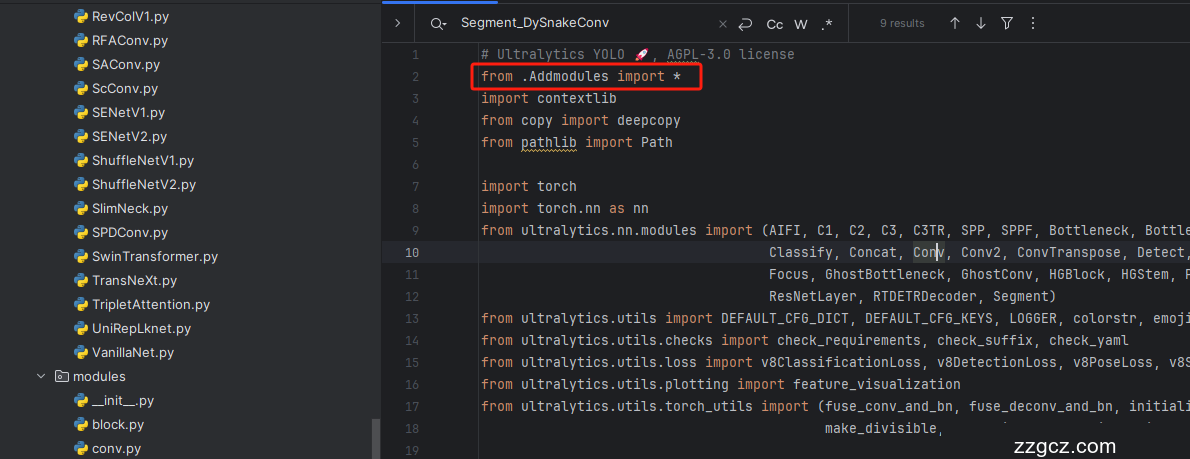
第一还是建立文件,我们找到如下 ultralytics /nn文件夹下建立一个目录名字呢就是'Addmodules'文件夹 (用群内的文件的话已经有了无需新建) !然后在其内部建立一个新的py文件将核心代码复制粘贴进去即可。

4.2 修改二
第二步我们在该目录下创建一个新的py文件名字为'__init__.py'( 用群内的文件的话已经有了无需新建) ,然后在其内部导入我们的检测头如下图所示。

4.3 修改三
第三步我门中到如下文件'ultralytics/nn/tasks.py'进行导入和注册我们的模块( 用群内的文件的话已经有了无需重新导入直接开始第四步即可) !
从今天开始以后的教程就都统一成这个样子了,因为我默认大家用了我群内的文件来进行修改!!
4.4 修改四
按照我的添加在parse_model里添加即可。

打印计算量的问题!
计算的GFLOPs计算 异常 不打印,所以需要额外修改一处, 我们找到如下文件'ultralytics/utils/torch_utils.py'文件内有如下的代码按照如下的图片进行修改,有一个get_flops的函数我们直接用我给的代码全部替换!

- def get_flops(model, imgsz=640):
- """Return a YOLO model's FLOPs."""
- if not thop:
- return 0.0 # if not installed return 0.0 GFLOPs
- try:
- model = de_parallel(model)
- p = next(model.parameters())
- if not isinstance(imgsz, list):
- imgsz = [imgsz, imgsz] # expand if int/float
- try:
- # Use stride size for input tensor
- stride = 640
- im = torch.empty((1, 3, stride, stride), device=p.device) # input image in BCHW format
- flops = thop.profile(deepcopy(model), inputs=[im], verbose=False)[0] / 1e9 * 2 # stride GFLOPs
- return flops * imgsz[0] / stride * imgsz[1] / stride # imgsz GFLOPs
- except Exception:
- # Use actual image size for input tensor (i.e. required for RTDETR models)
- im = torch.empty((1, p.shape[1], *imgsz), device=p.device) # input image in BCHW format
- return thop.profile(deepcopy(model), inputs=[im], verbose=False)[0] / 1e9 * 2 # imgsz GFLOPs
- except Exception:
- return 0.0
到此就修改完成了,大家可以复制下面的yaml文件运行。
五、yaml文件和运行记录
5.1 yaml文件
此版本训练信息:YOLO11-FFA summary: 397 layers, 2,597,339 parameters, 2,597,323 gradients, 11.6 GFLOPs
- # Ultralytics YOLO 🚀, AGPL-3.0 license
- # YOLOv10 object detection model. For Usage examples see https://docs.ultralytics.com/tasks/detect
- # Parameters
- nc: 80 # number of classes
- scales: # model compound scaling constants, i.e. 'model=yolov10n.yaml' will call yolov10.yaml with scale 'n'
- # [depth, width, max_channels]
- n: [0.33, 0.25, 1024]
- backbone:
- # [from, repeats, module, args]
- - [-1, 1, FFA, []] # 0-P1/2
- - [-1, 1, Conv, [64, 3, 2]] # 1-P1/2
- - [-1, 1, Conv, [128, 3, 2]] # 2-P2/4
- - [-1, 3, C2f, [128, True]]
- - [-1, 1, Conv, [256, 3, 2]] # 4-P3/8
- - [-1, 6, C2f, [256, True]]
- - [-1, 1, SCDown, [512, 3, 2]] # 6-P4/16
- - [-1, 6, C2f, [512, True]]
- - [-1, 1, SCDown, [1024, 3, 2]] # 8-P5/32
- - [-1, 3, C2f, [1024, True]]
- - [-1, 1, SPPF, [1024, 5]] # 10
- - [-1, 1, PSA, [1024]] # 11
- # YOLOv10.0n head
- head:
- - [-1, 1, nn.Upsample, [None, 2, "nearest"]]
- - [[-1, 7], 1, Concat, [1]] # cat backbone P4
- - [-1, 3, C2f, [512]] # 14
- - [-1, 1, nn.Upsample, [None, 2, "nearest"]]
- - [[-1, 5], 1, Concat, [1]] # cat backbone P3
- - [-1, 3, C2f, [256]] # 17 (P3/8-small)
- - [-1, 1, Conv, [256, 3, 2]]
- - [[-1, 14], 1, Concat, [1]] # cat head P4
- - [-1, 3, C2f, [512]] # 20 (P4/16-medium)
- - [-1, 1, SCDown, [512, 3, 2]]
- - [[-1, 11], 1, Concat, [1]] # cat head P5
- - [-1, 3, C2fCIB, [1024, True, True]] # 23 (P5/32-large)
- - [[17, 20, 23], 1, v10Detect, [nc]] # Detect(P3, P4, P5)
5.2 训练代码
大家可以创建一个py文件将我给的代码复制粘贴进去,配置好自己的文件路径即可运行。
- import warnings
- warnings.filterwarnings('ignore')
- from ultralytics import YOLO
- if __name__ == '__main__':
- model = YOLO('ultralytics/cfg/models/v8/yolov8-C2f-FasterBlock.yaml')
- # model.load('yolov8n.pt') # loading pretrain weights
- model.train(data=r'替换数据集yaml文件地址',
- # 如果大家任务是其它的'ultralytics/cfg/default.yaml'找到这里修改task可以改成detect, segment, classify, pose
- cache=False,
- imgsz=640,
- epochs=150,
- single_cls=False, # 是否是单类别检测
- batch=4,
- close_mosaic=10,
- workers=0,
- device='0',
- optimizer='SGD', # using SGD
- # resume='', # 如过想续训就设置last.pt的地址
- amp=False, # 如果出现训练损失为Nan可以关闭amp
- project='runs/train',
- name='exp',
- )
5.3 训练过程截图

五、本文总结
到此本文的正式分享内容就结束了,在这里给大家推荐我的YOLOv11改进有效涨点专栏,本专栏目前为新开的平均质量分98分,后期我会根据各种最新的前沿顶会进行论文复现,也会对一些老的改进机制进行补充,如果大家觉得本文帮助到你了,订阅本专栏,关注后续更多的更新~