一、本文介绍
本文给大家带来的改进机制是 EMAttention注意力机制 ,它的 核心思想是 ,重塑部分通道到批次维度,并将通道维度分组为多个子特征,以保留每个通道的信息并减少计算开销。 EMA 模块通过编码全局信息来重新校准每个并行分支中的通道权重,并通过跨维度交互来捕获像素级别的关系。本文首先给大家提供效果图 ( 由基础版本未作任何修改和修改了本文的改进机制的效果对比图 ) ,然后介绍其 主要的 原理, 最后手把手教大家如何添加该注意力机制 。

二、EMAttention的框架原理

官方论文地址: 官方论文地址
官方代码地址: 官方代码地址

主要原理是一个新型的高效多尺度注意力(EMA)这个模块通过重塑部分通道到批次维度,并将通道维度分组为多个子特征,以保留每个通道的信息并减少计算开销。EMA模块通过编码全局信息来重新校准每个并行分支中的通道权重,并通过跨维度交互来捕获像素级别的关系。
提出的创新点主要包括:
1. 高效多尺度注意力(EMA)模:这是一种新型的 注意力机制 ,专为 计算机视觉 任务设计,旨在同时减少计算开销和保留每个通道的关键信息。
2. 通道和批次维度的重组:EMA通过重新组织通道维度和批次维度,提高了 模型 处理特征的能力。
3. 跨维度交互:模块利用跨维度的交互来捕捉像素级别的关系,这在传统的注意力模型中较为少见。
4. 全局信息编码和通道权重校准:EMA模块在并行分支中编码全局信息,用于通道权重的重新校准,增强了特征表示的能力。

这张图片是文章中提出的高效多尺度注意力(EMA)模块的示意图。"g"表示输入通道被分成的组数。"X Avg Pool"和"Y Avg Pool"分别代表一维水平和垂直的全局池化操作。在EMA模块中,输入首先被分组,然后通过不同的分支进行处理:一个分支进行一维全局池化,另一个通过3x3的卷积进行特征提取。两个分支的输出特征之后通过sigmoid 函数 和归一化操作进行调制,最终通过跨维度交互模块合并,以捕捉像素级的成对关系。经过最终的sigmoid调节后,输出特征映射以增强或减弱原始输入特征,从而得到最终输出。
三、EMAttention的核心代码
使用方法看章节四。
- import torch
- from torch import nn
- __all__ = ['EMA', 'C2PSA_EMA']
- class EMA(nn.Module):
- def __init__(self, channels, factor=16):
- super(EMA, self).__init__()
- self.groups = factor
- assert channels // self.groups > 0
- self.softmax = nn.Softmax(-1)
- self.agp = nn.AdaptiveAvgPool2d((1, 1))
- self.pool_h = nn.AdaptiveAvgPool2d((None, 1))
- self.pool_w = nn.AdaptiveAvgPool2d((1, None))
- self.gn = nn.GroupNorm(channels // self.groups, channels // self.groups)
- self.conv1x1 = nn.Conv2d(channels // self.groups, channels // self.groups, kernel_size=1, stride=1, padding=0)
- self.conv3x3 = nn.Conv2d(channels // self.groups, channels // self.groups, kernel_size=3, stride=1, padding=1)
- def forward(self, x):
- b, c, h, w = x.size()
- group_x = x.reshape(b * self.groups, -1, h, w) # b*g,c//g,h,w
- x_h = self.pool_h(group_x)
- x_w = self.pool_w(group_x).permute(0, 1, 3, 2)
- hw = self.conv1x1(torch.cat([x_h, x_w], dim=2))
- x_h, x_w = torch.split(hw, [h, w], dim=2)
- x1 = self.gn(group_x * x_h.sigmoid() * x_w.permute(0, 1, 3, 2).sigmoid())
- x2 = self.conv3x3(group_x)
- x11 = self.softmax(self.agp(x1).reshape(b * self.groups, -1, 1).permute(0, 2, 1))
- x12 = x2.reshape(b * self.groups, c // self.groups, -1) # b*g, c//g, hw
- x21 = self.softmax(self.agp(x2).reshape(b * self.groups, -1, 1).permute(0, 2, 1))
- x22 = x1.reshape(b * self.groups, c // self.groups, -1) # b*g, c//g, hw
- weights = (torch.matmul(x11, x12) + torch.matmul(x21, x22)).reshape(b * self.groups, 1, h, w)
- return (group_x * weights.sigmoid()).reshape(b, c, h, w)
- def autopad(k, p=None, d=1): # kernel, padding, dilation
- """Pad to 'same' shape outputs."""
- if d > 1:
- k = d * (k - 1) + 1 if isinstance(k, int) else [d * (x - 1) + 1 for x in k] # actual kernel-size
- if p is None:
- p = k // 2 if isinstance(k, int) else [x // 2 for x in k] # auto-pad
- return p
- class Conv(nn.Module):
- """Standard convolution with args(ch_in, ch_out, kernel, stride, padding, groups, dilation, activation)."""
- default_act = nn.SiLU() # default activation
- def __init__(self, c1, c2, k=1, s=1, p=None, g=1, d=1, act=True):
- """Initialize Conv layer with given arguments including activation."""
- super().__init__()
- self.conv = nn.Conv2d(c1, c2, k, s, autopad(k, p, d), groups=g, dilation=d, bias=False)
- self.bn = nn.BatchNorm2d(c2)
- self.act = self.default_act if act is True else act if isinstance(act, nn.Module) else nn.Identity()
- def forward(self, x):
- """Apply convolution, batch normalization and activation to input tensor."""
- return self.act(self.bn(self.conv(x)))
- def forward_fuse(self, x):
- """Perform transposed convolution of 2D data."""
- return self.act(self.conv(x))
- class PSABlock(nn.Module):
- """
- PSABlock class implementing a Position-Sensitive Attention block for neural networks.
- This class encapsulates the functionality for applying multi-head attention and feed-forward neural network layers
- with optional shortcut connections.
- Attributes:
- attn (Attention): Multi-head attention module.
- ffn (nn.Sequential): Feed-forward neural network module.
- add (bool): Flag indicating whether to add shortcut connections.
- Methods:
- forward: Performs a forward pass through the PSABlock, applying attention and feed-forward layers.
- Examples:
- Create a PSABlock and perform a forward pass
- >>> psablock = PSABlock(c=128, attn_ratio=0.5, num_heads=4, shortcut=True)
- >>> input_tensor = torch.randn(1, 128, 32, 32)
- >>> output_tensor = psablock(input_tensor)
- """
- def __init__(self, c, attn_ratio=0.5, num_heads=4, shortcut=True) -> None:
- """Initializes the PSABlock with attention and feed-forward layers for enhanced feature extraction."""
- super().__init__()
- self.attn = EMA(c)
- self.ffn = nn.Sequential(Conv(c, c * 2, 1), Conv(c * 2, c, 1, act=False))
- self.add = shortcut
- def forward(self, x):
- """Executes a forward pass through PSABlock, applying attention and feed-forward layers to the input tensor."""
- x = x + self.attn(x) if self.add else self.attn(x)
- x = x + self.ffn(x) if self.add else self.ffn(x)
- return x
- class C2PSA_EMA(nn.Module):
- """
- C2PSA module with attention mechanism for enhanced feature extraction and processing.
- This module implements a convolutional block with attention mechanisms to enhance feature extraction and processing
- capabilities. It includes a series of PSABlock modules for self-attention and feed-forward operations.
- Attributes:
- c (int): Number of hidden channels.
- cv1 (Conv): 1x1 convolution layer to reduce the number of input channels to 2*c.
- cv2 (Conv): 1x1 convolution layer to reduce the number of output channels to c.
- m (nn.Sequential): Sequential container of PSABlock modules for attention and feed-forward operations.
- Methods:
- forward: Performs a forward pass through the C2PSA module, applying attention and feed-forward operations.
- Notes:
- This module essentially is the same as PSA module, but refactored to allow stacking more PSABlock modules.
- Examples:
- >>> c2psa = C2PSA(c1=256, c2=256, n=3, e=0.5)
- >>> input_tensor = torch.randn(1, 256, 64, 64)
- >>> output_tensor = c2psa(input_tensor)
- """
- def __init__(self, c1, c2, n=1, e=0.5):
- """Initializes the C2PSA module with specified input/output channels, number of layers, and expansion ratio."""
- super().__init__()
- assert c1 == c2
- self.c = int(c1 * e)
- self.cv1 = Conv(c1, 2 * self.c, 1, 1)
- self.cv2 = Conv(2 * self.c, c1, 1)
- self.m = nn.Sequential(*(PSABlock(self.c, attn_ratio=0.5, num_heads=self.c // 64) for _ in range(n)))
- def forward(self, x):
- """Processes the input tensor 'x' through a series of PSA blocks and returns the transformed tensor."""
- a, b = self.cv1(x).split((self.c, self.c), dim=1)
- b = self.m(b)
- return self.cv2(torch.cat((a, b), 1))
- if __name__ == "__main__":
- # Generating Sample image
- image_size = (1, 64, 240, 240)
- image = torch.rand(*image_size)
- # Model
- mobilenet_v1 = C2PSA_EMA(64, 64)
- out = mobilenet_v1(image)
- print(out.size())
四、手把手教你添加EMAttention
4.1 修改一
第一还是建立文件,我们找到如下 ultralytics /nn文件夹下建立一个目录名字呢就是'Addmodules'文件夹( 用群内的文件的话已经有了无需新建) !然后在其内部建立一个新的py文件将核心代码复制粘贴进去即可。

4.2 修改二
第二步我们在该目录下创建一个新的py文件名字为'__init__.py'( 用群内的文件的话已经有了无需新建) ,然后在其内部导入我们的检测头如下图所示。

4.3 修改三
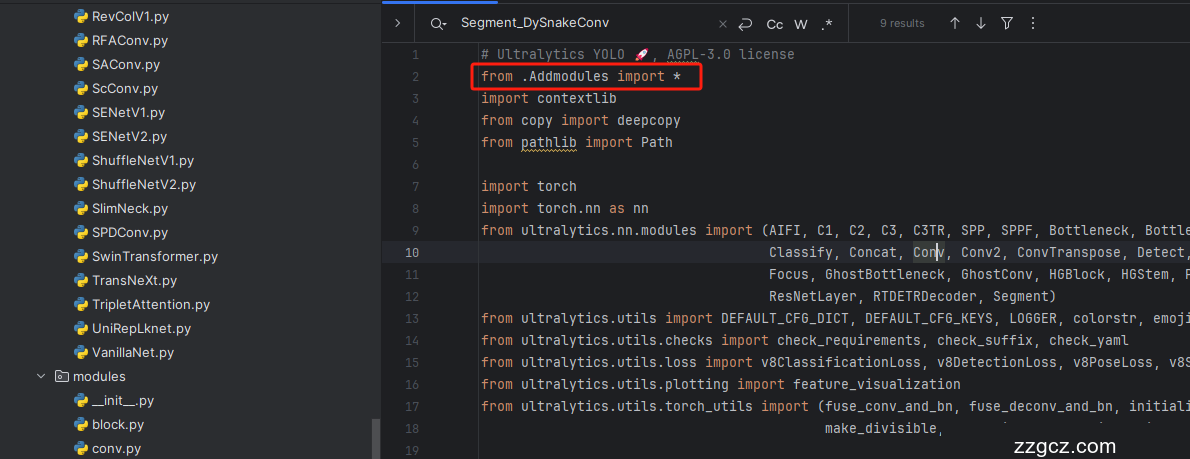
第三步我门中到如下文件'ultralytics/nn/tasks.py'进行导入和注册我们的模块( 用群内的文件的话已经有了无需重新导入直接开始第四步即可) !
从今天开始以后的教程就都统一成这个样子了,因为我默认大家用了我群内的文件来进行修改!!
4.4 修改四
按照我的添加在parse_model里添加即可,两个图片都是本文的机制大家按照图片进行添加即可!

到此就修改完成了,大家可以复制下面的yaml文件运行。
五、EMAttention的yaml文件和运行记录
下面推荐几个版本的yaml文件给大家,大家可以复制进行训练,但是组合用很多具体那种最有效果都不一定,针对不同的数据集效果也不一样,我不可每一种都做实验,所以我下面推荐了几种我自己认为可能有效果的配合方式,你也可以自己进行组合。
5.1 EMAttention的yaml版本一(推荐)
YOLO11-C2PSA-EMA summary: 315 layers, 2,544,059 parameters, 2,544,043 gradients, 6.4 GFLOPs
- # Ultralytics YOLO 🚀, AGPL-3.0 license
- # YOLO11 object detection model with P3-P5 outputs. For Usage examples see https://docs.ultralytics.com/tasks/detect
- # Parameters
- nc: 80 # number of classes
- scales: # model compound scaling constants, i.e. 'model=yolo11n.yaml' will call yolo11.yaml with scale 'n'
- # [depth, width, max_channels]
- n: [0.50, 0.25, 1024] # summary: 319 layers, 2624080 parameters, 2624064 gradients, 6.6 GFLOPs
- s: [0.50, 0.50, 1024] # summary: 319 layers, 9458752 parameters, 9458736 gradients, 21.7 GFLOPs
- m: [0.50, 1.00, 512] # summary: 409 layers, 20114688 parameters, 20114672 gradients, 68.5 GFLOPs
- l: [1.00, 1.00, 512] # summary: 631 layers, 25372160 parameters, 25372144 gradients, 87.6 GFLOPs
- x: [1.00, 1.50, 512] # summary: 631 layers, 56966176 parameters, 56966160 gradients, 196.0 GFLOPs
- # YOLO11n backbone
- backbone:
- # [from, repeats, module, args]
- - [-1, 1, Conv, [64, 3, 2]] # 0-P1/2
- - [-1, 1, Conv, [128, 3, 2]] # 1-P2/4
- - [-1, 2, C3k2, [256, False, 0.25]]
- - [-1, 1, Conv, [256, 3, 2]] # 3-P3/8
- - [-1, 2, C3k2, [512, False, 0.25]]
- - [-1, 1, Conv, [512, 3, 2]] # 5-P4/16
- - [-1, 2, C3k2, [512, True]]
- - [-1, 1, Conv, [1024, 3, 2]] # 7-P5/32
- - [-1, 2, C3k2, [1024, True]]
- - [-1, 1, SPPF, [1024, 5]] # 9
- - [-1, 2, C2PSA_EMA, [1024]] # 10
- # YOLO11n head
- head:
- - [-1, 1, nn.Upsample, [None, 2, "nearest"]]
- - [[-1, 6], 1, Concat, [1]] # cat backbone P4
- - [-1, 2, C3k2, [512, False]] # 13
- - [-1, 1, nn.Upsample, [None, 2, "nearest"]]
- - [[-1, 4], 1, Concat, [1]] # cat backbone P3
- - [-1, 2, C3k2, [256, False]] # 16 (P3/8-small)
- - [-1, 1, Conv, [256, 3, 2]]
- - [[-1, 13], 1, Concat, [1]] # cat head P4
- - [-1, 2, C3k2, [512, False]] # 19 (P4/16-medium)
- - [-1, 1, Conv, [512, 3, 2]]
- - [[-1, 10], 1, Concat, [1]] # cat head P5
- - [-1, 2, C3k2, [1024, True]] # 22 (P5/32-large)
- - [[16, 19, 22], 1, Detect, [nc]] # Detect(P3, P4, P5)
5.2 EMAttention 的yaml版本二
YOLO11-EMA summary: 343 layers, 2,598,187 parameters, 2,598,171 gradients, 6.6 GFLOPs
- # Ultralytics YOLO 🚀, AGPL-3.0 license
- # YOLO11 object detection model with P3-P5 outputs. For Usage examples see https://docs.ultralytics.com/tasks/detect
- # Parameters
- nc: 80 # number of classes
- scales: # model compound scaling constants, i.e. 'model=yolo11n.yaml' will call yolo11.yaml with scale 'n'
- # [depth, width, max_channels]
- n: [0.50, 0.25, 1024] # summary: 319 layers, 2624080 parameters, 2624064 gradients, 6.6 GFLOPs
- s: [0.50, 0.50, 1024] # summary: 319 layers, 9458752 parameters, 9458736 gradients, 21.7 GFLOPs
- m: [0.50, 1.00, 512] # summary: 409 layers, 20114688 parameters, 20114672 gradients, 68.5 GFLOPs
- l: [1.00, 1.00, 512] # summary: 631 layers, 25372160 parameters, 25372144 gradients, 87.6 GFLOPs
- x: [1.00, 1.50, 512] # summary: 631 layers, 56966176 parameters, 56966160 gradients, 196.0 GFLOPs
- # YOLO11n backbone
- backbone:
- # [from, repeats, module, args]
- - [-1, 1, Conv, [64, 3, 2]] # 0-P1/2
- - [-1, 1, Conv, [128, 3, 2]] # 1-P2/4
- - [-1, 2, C3k2, [256, False, 0.25]]
- - [-1, 1, Conv, [256, 3, 2]] # 3-P3/8
- - [-1, 2, C3k2, [512, False, 0.25]]
- - [-1, 1, Conv, [512, 3, 2]] # 5-P4/16
- - [-1, 2, C3k2, [512, True]]
- - [-1, 1, Conv, [1024, 3, 2]] # 7-P5/32
- - [-1, 2, C3k2, [1024, True]]
- - [-1, 1, SPPF, [1024, 5]] # 9
- - [-1, 2, C2PSA, [1024]] # 10
- # YOLO11n head
- head:
- - [-1, 1, nn.Upsample, [None, 2, "nearest"]]
- - [[-1, 6], 1, Concat, [1]] # cat backbone P4
- - [-1, 2, C3k2, [512, False]] # 13
- - [-1, 1, nn.Upsample, [None, 2, "nearest"]]
- - [[-1, 4], 1, Concat, [1]] # cat backbone P3
- - [-1, 2, C3k2, [256, False]] # 16 (P3/8-small)
- - [-1, 1, EMA, []] # 17 (P3/8-small) 小目标检测层输出位置增加注意力机制
- - [-1, 1, Conv, [256, 3, 2]]
- - [[-1, 13], 1, Concat, [1]] # cat head P4
- - [-1, 2, C3k2, [512, False]] # 20 (P4/16-medium)
- - [-1, 1, EMA, []] # 21 (P4/16-medium) 中目标检测层输出位置增加注意力机制
- - [-1, 1, Conv, [512, 3, 2]]
- - [[-1, 10], 1, Concat, [1]] # cat head P5
- - [-1, 2, C3k2, [1024, True]] # 24 (P5/32-large)
- - [-1, 1, EMA, []] # 25 (P5/32-large) 大目标检测层输出位置增加注意力机制
- # 具体在那一层用注意力机制可以根据自己的数据集场景进行选择。
- # 如果你自己配置注意力位置注意from[17, 21, 25]位置要对应上对应的检测层!
- - [[17, 21, 25], 1, Detect, [nc]] # Detect(P3, P4, P5)
5.3 训练代码
大家可以创建一个py文件将我给的代码复制粘贴进去,配置好自己的文件路径即可运行。
- import warnings
- warnings.filterwarnings('ignore')
- from ultralytics import YOLO
- if __name__ == '__main__':
- model = YOLO('ultralytics/cfg/models/v8/yolov8-C2f-FasterBlock.yaml')
- # model.load('yolov8n.pt') # loading pretrain weights
- model.train(data=r'替换数据集yaml文件地址',
- # 如果大家任务是其它的'ultralytics/cfg/default.yaml'找到这里修改task可以改成detect, segment, classify, pose
- cache=False,
- imgsz=640,
- epochs=150,
- single_cls=False, # 是否是单类别检测
- batch=4,
- close_mosaic=10,
- workers=0,
- device='0',
- optimizer='SGD', # using SGD
- # resume='', # 如过想续训就设置last.pt的地址
- amp=False, # 如果出现训练损失为Nan可以关闭amp
- project='runs/train',
- name='exp',
- )
5.4 EMAttention 的训练过程截图
下面是添加了EMAttention的训练截图。

五、本文总结
到此本文的正式分享内容就结束了,在这里给大家推荐我的YOLOv11改进有效涨点专栏,本专栏目前为新开的平均质量分98分,后期我会根据各种最新的前沿顶会进行论文复现,也会对一些老的改进机制进行补充, 目前本专栏免费阅读(暂时,大家尽早关注不迷路~) ,如果大家觉得本文帮助到你了,订阅本专栏,关注后续更多的更新~
