零样本目标检测
在传统方式中,用于目标检测的模型需要标注的图像数据集进行训练,并且仅限于检测训练数据中的类。
零样本目标检测由 OWL-ViT 模型支持,该模型采用了一种不同的方法。OWL-ViT 是一种开放词汇目标检测器,它可以根据自由文本查询检测图像中的对象,而无需对模型进行微调以适应标注数据集。
OWL-ViT 利用多模态表示来执行开放词汇检测。它结合了 CLIP 与轻量级的对象分类和定位头。通过使用 CLIP 的文本编码器嵌入自由文本查询,并将其作为对象分类和定位头的输入,这些头将图像与其相应的文本描述关联起来,而 ViT 处理图像补丁作为输入。OWL-ViT 的作者首先从头开始训练 CLIP,然后在标准目标检测数据集上使用二部匹配损失对 OWL-ViT 进行端到端微调。
通过这种方法,模型可以根据文本描述检测对象,而无需预先在标注数据集上进行训练。
在这个指南中,你将学习如何使用 OWL-ViT:
- 基于文本提示检测对象
- 批量目标检测
- 图像引导的目标检测
在开始之前,请确保你已经安装了所有必要的库:
pip install -q transformers
零样本目标检测管道
使用 OWL-ViT 进行推理的最简单方法是通过 pipeline()。从 Hugging Face Hub 上的一个检查点实例化一个零样本目标检测管道:
from transformers import pipeline

checkpoint = "google/owlv2-base-patch16-ensemble"
detector = pipeline(model=checkpoint, task="zero-shot-object-detection")
接下来,选择一张你想要检测对象的图像。这里我们将使用 NASA Great Images 数据集中的一张宇航员 Eileen Collins 的图片。
import skimage
import numpy as np
from PIL import Image

image = skimage.data.astronaut()
image = Image.fromarray(np.uint8(image)).convert("RGB")
image
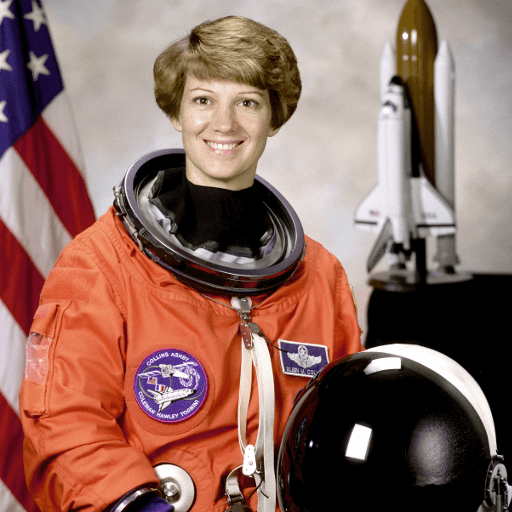
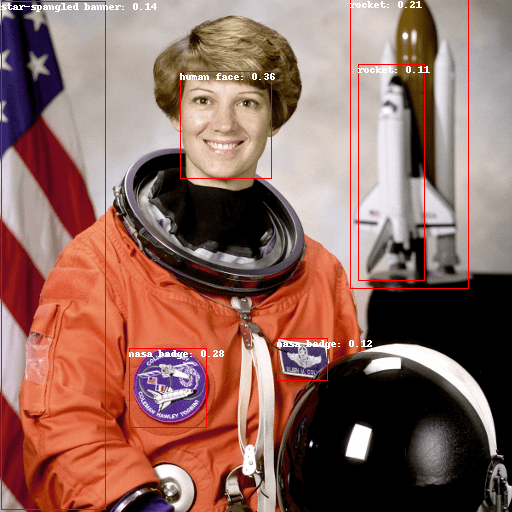
将图像和候选对象标签传递给管道。这里我们直接传递图像;其他合适的选项包括本地图像路径或图像 URL。我们还传递了要查询的所有项目的文本描述。
predictions = detector(
    image,
    candidate_labels=["human face", "rocket", "nasa badge", "star-spangled banner"],
)
predictions
让我们可视化预测结果:
from PIL import ImageDraw

draw = ImageDraw.Draw(image)

for prediction in predictions:
    box = prediction["box"]
    label = prediction["label"]
    score = prediction["score"]

    xmin, ymin, xmax, ymax = box.values()
    draw.rectangle((xmin, ymin, xmax, ymax), outline="red", width=1)
    draw.text((xmin, ymin), f"{label}: {round(score,2)}", fill="white")

image
手动进行基于文本提示的零样本目标检测
现在你已经看到了如何使用零样本目标检测管道,让我们手动复制相同的结果。
首先从 Hugging Face Hub 加载模型和相关处理器。这里我们将使用与之前相同的检查点:
from transformers import AutoProcessor, AutoModelForZeroShotObjectDetection

model = AutoModelForZeroShotObjectDetection.from_pretrained(checkpoint)
processor = AutoProcessor.from_pretrained(checkpoint)
为了换换口味,我们选择一张不同的图像。
import requests

url = "https://unsplash.com/photos/oj0zeY2Ltk4/download?ixid=MnwxMjA3fDB8MXxzZWFyY2h8MTR8fHBpY25pY3xlbnwwfHx8fDE2Nzc0OTE1NDk&force=true&w=640"
im = Image.open(requests.get(url, stream=True).raw)
im
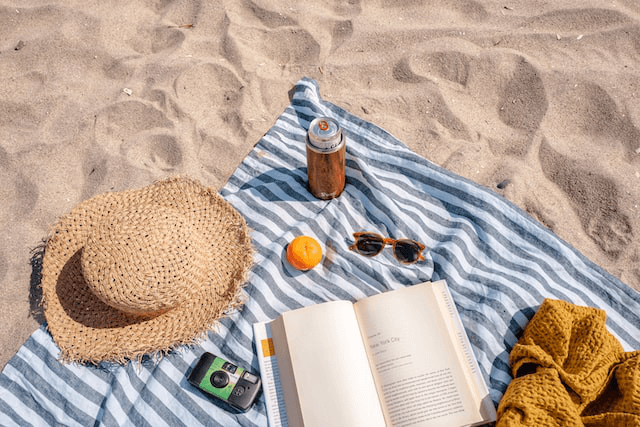
使用处理器准备模型的输入。处理器结合了一个图像处理器,该处理器通过调整大小和归一化来准备图像,以及一个 CLIPTokenizer,它负责处理文本输入。
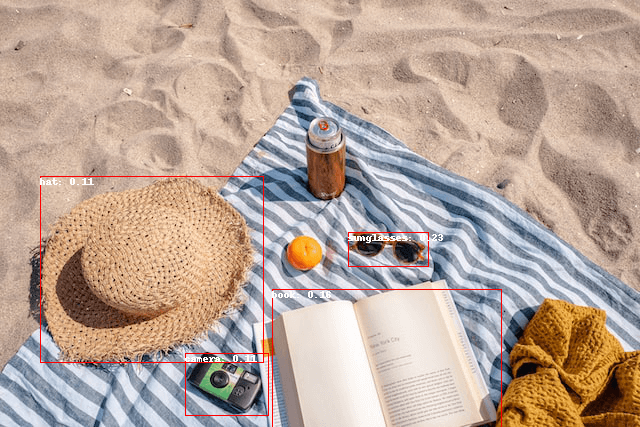
text_queries = ["hat", "book", "sunglasses", "camera"]
inputs = processor(text=text_queries, images=im, return_tensors="pt")
将输入传递给模型,进行后处理并可视化结果。由于图像处理器在将图像输入模型之前进行了调整大小,因此需要使用 post_process_object_detection() 方法,以确保预测的边界框相对于原始图像具有正确的坐标:
import torch

with torch.no_grad():
    outputs = model(**inputs)
    target_sizes = torch.tensor([im.size[::-1]])
    results = processor.post_process_object_detection(outputs, threshold=0.1, target_sizes=target_sizes)[0]

draw = ImageDraw.Draw(im)

scores = results["scores"].tolist()
labels = results["labels"].tolist()
boxes = results["boxes"].tolist()

for box, score, label in zip(boxes, scores, labels):
    xmin, ymin, xmax, ymax = box
    draw.rectangle((xmin, ymin, xmax, ymax), outline="red", width=1)
    draw.text((xmin, ymin), f"{text_queries[label]}: {round(score,2)}", fill="white")

im
批量处理
你可以传递多组图像和文本查询,以在多个图像中搜索不同的(或相同的)对象。让我们同时使用宇航员图像和海滩图像。对于批量处理,你应该将文本查询作为嵌套列表传递给处理器,将图像作为 PIL 图像、PyTorch 张量或 NumPy 数组的列表传递。
images = [image, im]
text_queries = [
    ["human face", "rocket", "nasa badge", "star-spangled banner"],
    ["hat", "book", "sunglasses", "camera"],
]
inputs = processor(text=text_queries, images=images, return_tensors="pt")
在后处理中,你之前传递了单个图像的大小作为张量,但你也可以传递一个元组,或者在处理多个图像时传递一个元组列表。让我们为两个示例创建预测,并可视化第二个示例(image_idx = 1)。
with torch.no_grad():
    outputs = model(**inputs)
    target_sizes = [x.size[::-1] for x in images]
    results = processor.post_process_object_detection(outputs, threshold=0.1, target_sizes=target_sizes)

image_idx = 1
draw = ImageDraw.Draw(images[image_idx])

scores = results[image_idx]["scores"].tolist()
labels = results[image_idx]["labels"].tolist()
boxes = results[image_idx]["boxes"].tolist()

for box, score, label in zip(boxes, scores, labels):
    xmin, ymin, xmax, ymax = box
    draw.rectangle((xmin, ymin, xmax, ymax), outline="red", width=1)
    draw.text((xmin, ymin), f"{text_queries[image_idx][label]}: {round(score,2)}", fill="white")

images[image_idx]
图像引导的目标检测
除了使用文本查询进行零样本目标检测外,OWL-ViT 还提供图像引导的目标检测。这意味着你可以使用图像查询在目标图像中找到类似的对象。与文本查询不同,只允许使用一个示例图像。
让我们选择一张沙发上两只猫的图像作为目标图像,一张单猫的图像作为查询图像:
url = "http://images.cocodataset.org/val2017/000000039769.jpg"
image_target = Image.open(requests.get(url, stream=True).raw)

query_url = "http://images.cocodataset.org/val2017/000000524280.jpg"
query_image = Image.open(requests.get(query_url, stream=True).raw)
让我们快速查看一下图像:
import matplotlib.pyplot as plt

fig, ax = plt.subplots(1, 2)
ax[0].imshow(image_target)
ax[1].imshow(query_image)
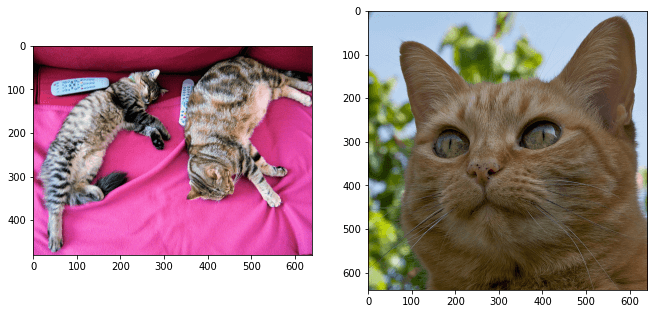
在预处理步骤中,你现在需要使用 query_images 而不是文本查询:
inputs = processor(images=image_target, query_images=query_image, return_tensors="pt")
对于预测,而不是将输入传递给模型,而是将它们传递给 image_guided_detection()。与之前一样绘制预测结果,但这次没有标签。
with torch.no_grad():
    outputs = model.image_guided_detection(**inputs)
    target_sizes = torch.tensor([image_target.size[::-1]])
    results = processor.post_process_image_guided_detection(outputs=outputs, target_sizes=target_sizes)[0]

draw = ImageDraw.Draw(image_target)

scores = results["scores"].tolist()
boxes = results["boxes"].tolist()

for box, score in zip(boxes, scores):
    xmin, ymin, xmax, ymax = box
    draw.rectangle((xmin, ymin, xmax, ymax), outline="white", width=4)

image_target
